Organic traffic optimizer

Every post you publish has more traffic to give
Rankings shift after you hit publish. Contentpen's organic traffic optimizer refreshes any published post, sharpens titles that win clicks, and keeps readers on the page longer.




Traffic optimizer for pages that already rank
Three content refresh modes
Click-worthy titles and metas
Easy-to-read, skimmable posts
How the organic traffic optimizer works
Pick a post, decide how much should change, and publish the update back to the same URL.

Pick the post with the most to gain
Paste any published URL into Content Refresh or open a page flagged in SEO opportunities. Contentpen captures the meta details, alt text of images, publish date, and internal links first.
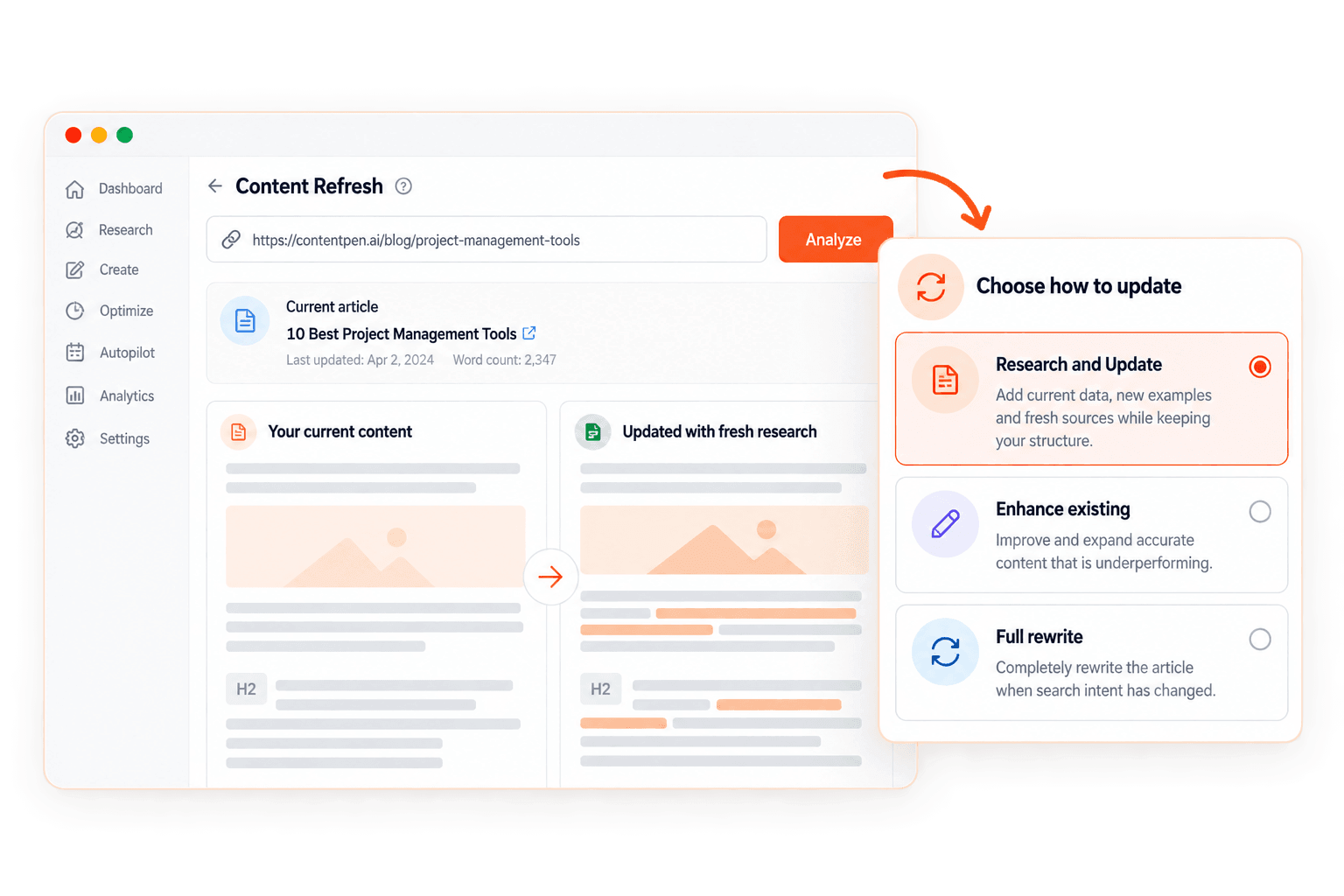
Choose how deep the refresh goes
Pick a refresh mode, then add a table of contents, key takeaways, or FAQs in the same pass. Light polish and full rewrites both start from the same screen.
Review and publish to the same URL
Compare the old and new versions side by side, check the updated SEO and GEO scores, and push the refreshed content to your CMS.
Bring outdated posts back up to date
The ‘Research and Update’ mode adds current data, new examples, and fresh data sources while your structure stays intact. Use the ‘Enhance existing’ option when a post is accurate but underperforms, or ‘Full rewrite’ when search intent has changed.

Tune new posts to the queries they actually win
Your draft targets one keyword. Once it goes live, Search Console shows the real queries bringing in impressions. Open the page from SEO opportunities and update the post around those queries while it is still climbing rankings.
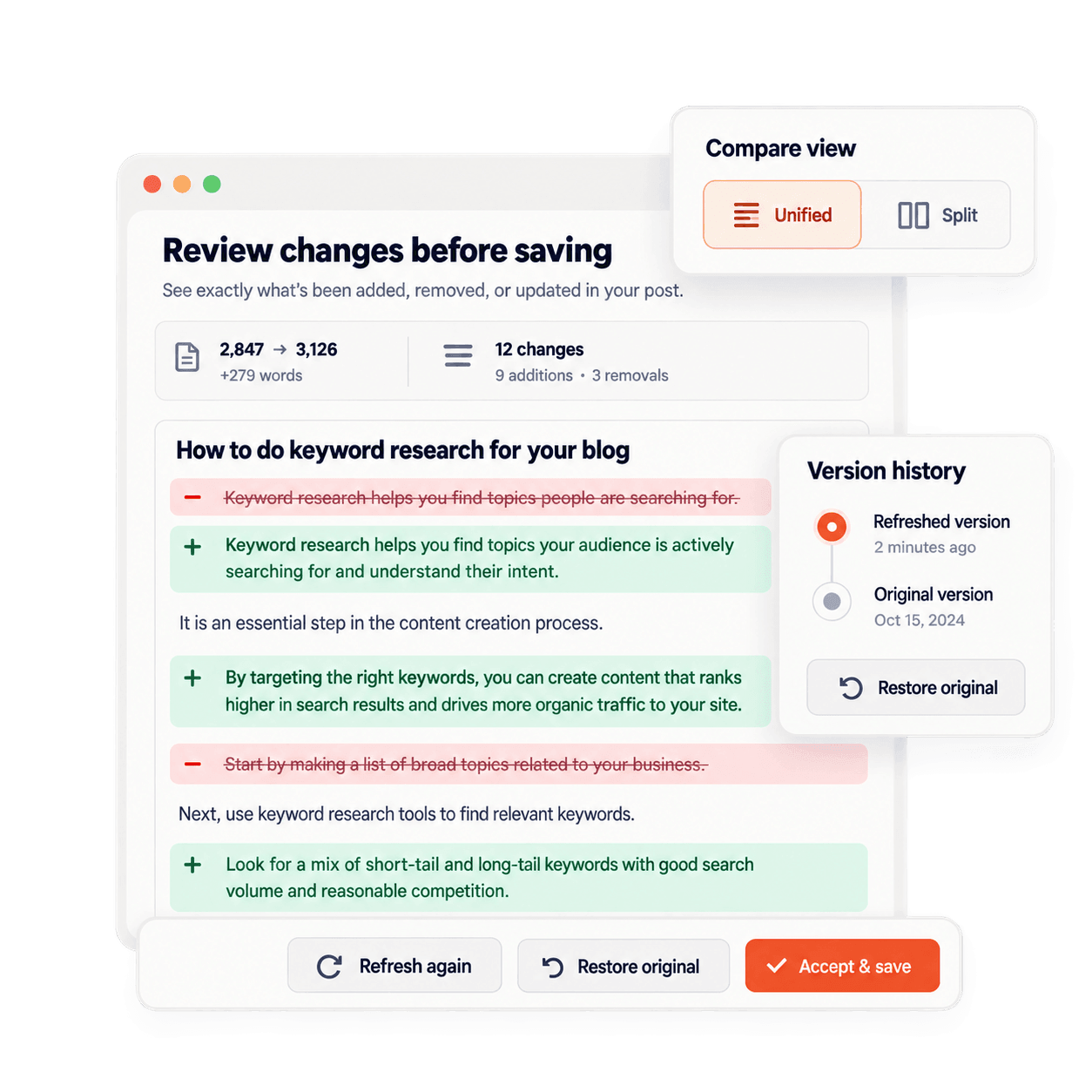
See every change before it goes live
Every refresh option opens a review screen with the word count change, content additions, and removals highlighted in a unified or split view. Accept it, refresh again, or restore the original post from version history.
Turn impressions into clicks
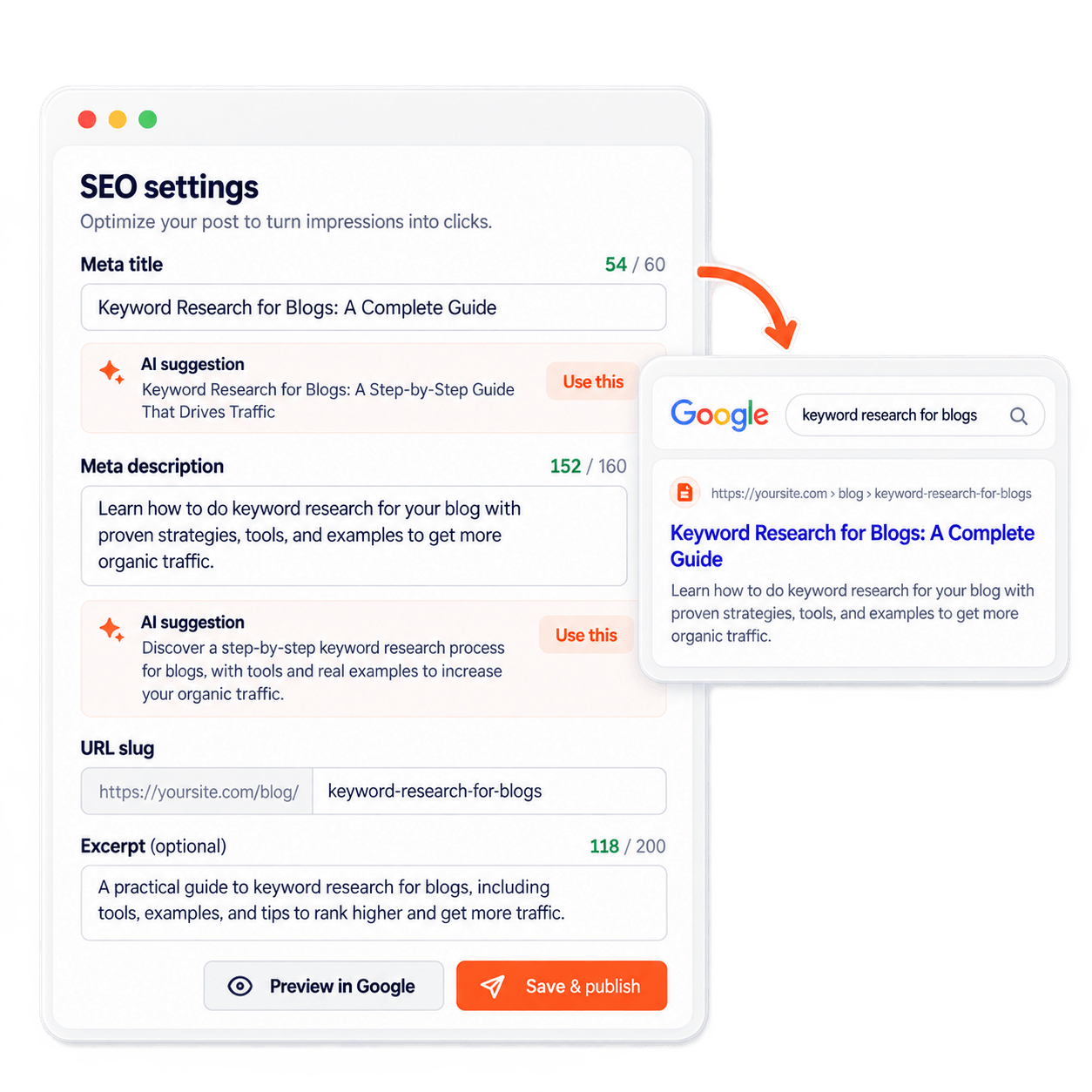
Get AI suggestions for your meta title and description with live character counters. Edit the slug and excerpt, and check the SERP preview before you publish.
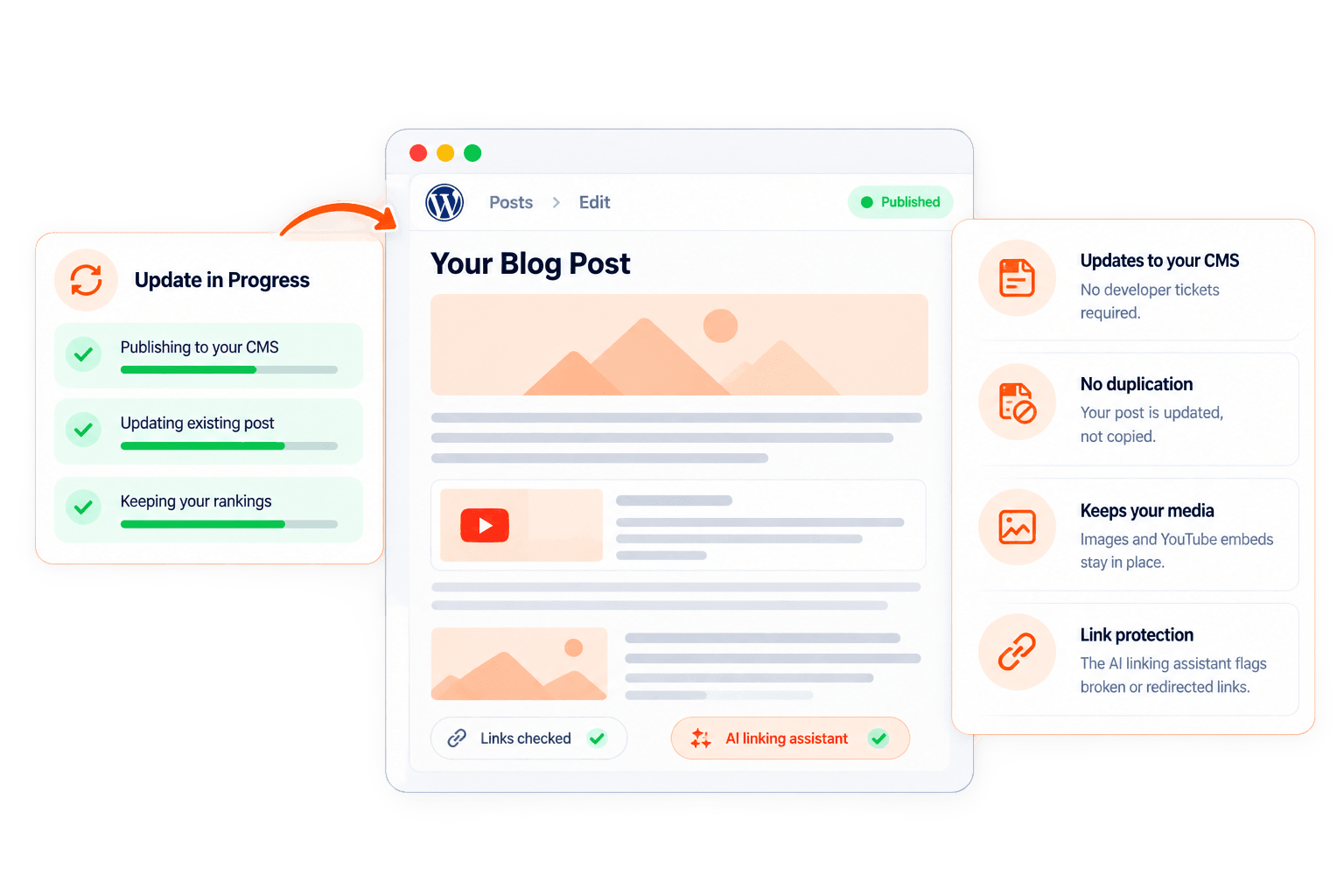
Updated in place and keeps your rankings
Contentpen publishes the refresh to your CMS and updates the existing post instead of duplicating it. No developer tickets required and no copy-pasting between tools. Your images and YouTube embeds stay put, and the AI linking assistant flags any link that is broken or redirected.
An AI assistant that knows what changed this year
Ask AI reads your whole article for context, researches the web, and cites its sources. Paste a product update and ask it to rewrite the section it affects, pull current benchmarks, or suggest competitor-proof titles without leaving the editor.

What it costs to publish and forget
Every post starts aging the day it goes live. Here is where neglect shows up in your traffic.
Early momentum fades when nobody acts on it
A new post's first weeks of impressions show which searches it is close to winning. Leaving the title and sections untouched risks losing the early momentum the post has built online, costing you steady organic clicks.
Old facts quietly cost you trust
A statistic from two years ago or a retired feature tells readers the page is stale. They leave for a fresher source, and shorter visits rarely help a page hold its position.
Dense pages lose readers in seconds
Long paragraphs and buried answers push visitors back to the search results. Every quick exit is a reader who never reaches your offer.
New posts can't outrun leaking old ones
Publishing more while older posts slide keeps your traffic flat. Refreshing a page Google already trusts usually improves visitors faster than a brand new post.
Get more traffic from posts you own
Refresh posts in minutes, keep the URL as is, and give every post more chances to rank and convert.
Teams growing traffic from content they already had
Hear from marketers and SEO and AEO leads who turned their blogs into steady sources of organic traffic with Contentpen.
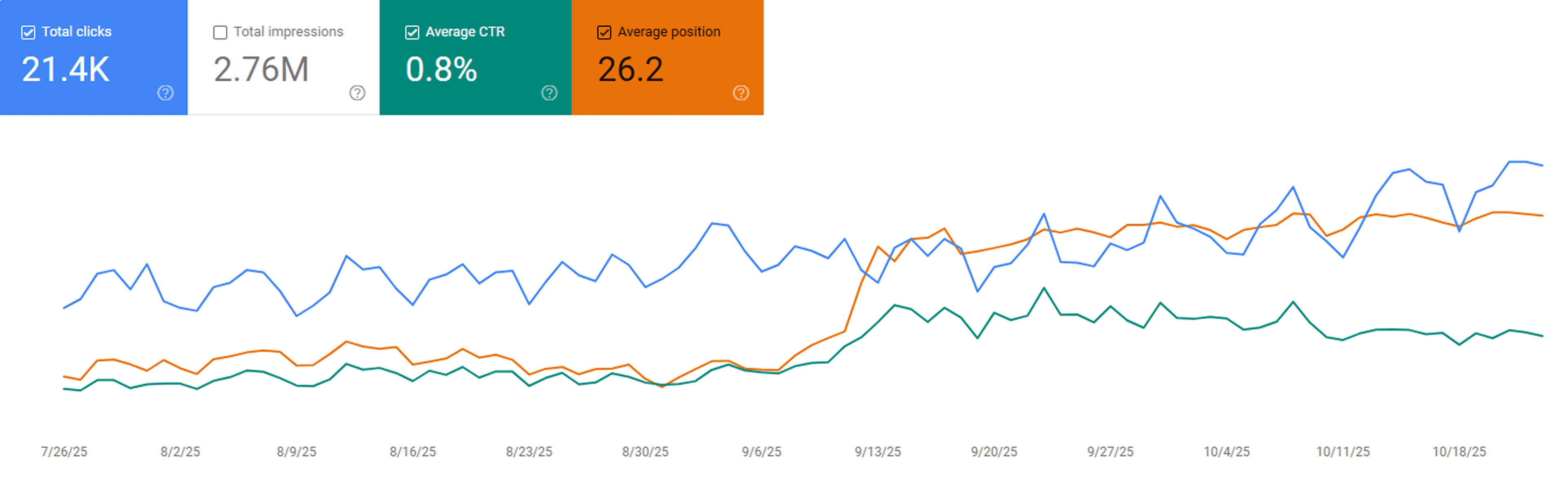
“After publishing our first 23 blogs through Contentpen, we noticed steady keyword growth in Google Search Console within three weeks. Impressions and clicks doubled, and a few articles started ranking on page one without paid promotion.”
 Sarah MalikSEO manager at GrowthHive
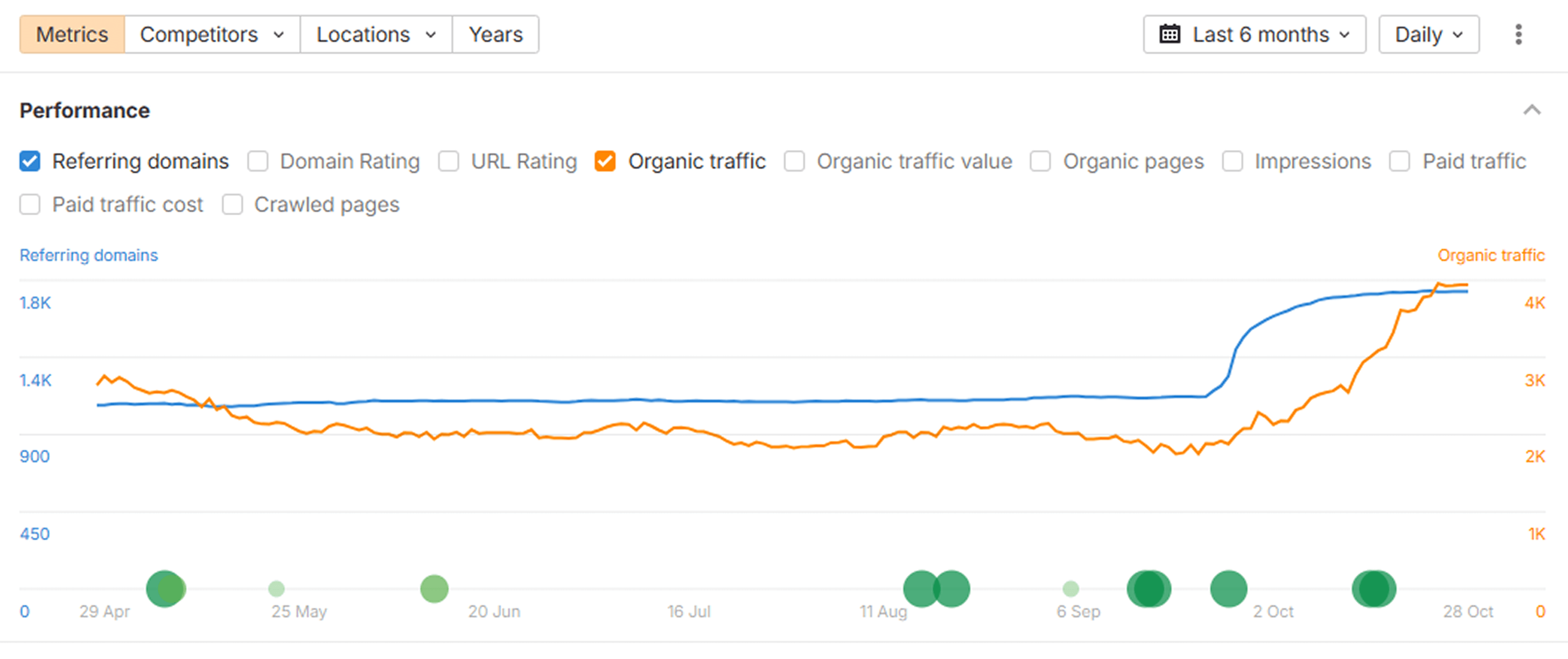
“We analyzed our new posts in Ahrefs and saw a clear lift in organic keywords and referring domains. The internal link suggestions from Contentpen helped us strengthen our site structure, which improved our overall domain visibility.”
 Daniel LeeContent strategist at BrightScale Media
“Before Contentpen, writing and publishing a blog took us a full day. Now we handle topic research, writing, and publishing in under an hour. Our organic traffic has grown 40% since streamlining our content process.”
 Ayesha KhanMarketing lead at CloudNest Solutions
“Tried Contentpen’s SERP and gap analysis before our next content sprint and found topics we’d completely missed. Rankings started moving within weeks.”
 Priya MalhotraSEO manager, CloudStack
“I wrote a blog post for one of my hospital clients using Contentpen. Once it got indexed, it started ranking at position 4 on the first page of Google. What's interesting is that I didn't build a single backlink.”
#4position0backlinks Ankit PrajapatiCEO at Consultant Ankit
“Contentpen helped us establish our presence both on SEO and AI search. Top-Quality content at the speed of thought.”
 Alban TaraireGeneral Manager at NETK5 Technology Group
“Contentpen delivers amazing quality blog posts and saves hours of research. It's fast, reliable, and perfect for efficient content creation.”
 Raj KandelMortgage Broker at Everest Home Loans
“I spend my time saved from blog writing and SEO tasks on building relationships with my clients, which actually benefits my business.”
$1000saved3-8h/weeksaved Keith HillPresident at Go Smart Mortgage
 AlaminMarketing content creator

“Contentpen spotted 7 keyword gaps our client’s top competitor was owning. Instant clarity on what to create next.”
 @JeremyHillsFounder, Rankline Agency
What optimized content adds up to
See what changes when teams keep their content fresh, readable, and built to win the click.
Higher organic traffic
Increase in organic clicks
Better keyword rankings
More leads from blogs
Keep every post working harder
Your refreshed post is live. Now use these features to help you find the next page to improve and keep the gains coming.
SEO opportunities
Automatically uncover quick wins, content decay, and CTR gaps, and turn insights into actions with one-click content refreshes.
SEO scoring
Get audit scores and suggestions for keyword usage, readability, and ranking signals before publishing.
AI linking assistant
Turn every article into a traffic network with AI-powered linking.
SEO autopilot
Automate blog posts from keyword to published article, and keep rankings growing hands-free.
Frequently asked questions
Quick answers on how Contentpen helps you increase organic traffic from every post you publish.
Learn more about organic traffic optimization with Contentpen
What is organic traffic optimization?
Organic traffic optimization is the practice of improving pages you have already published so they rank higher, earn more clicks, and hold attention longer. You will also hear it called historical optimization or a content refresh.
It works because search engines already know the page. A targeted update to facts, structure, and metadata can lift organic traffic faster than a new post that starts with no indexing history, links, and rankings.
How to increase organic traffic in 6 steps
- Find the posts with impressions, rankings, or traffic worth protecting in your Google Search Console data.
- Check what the current top results cover and note what your page is missing or gets wrong.
- Replace outdated facts, examples, and statistics with current, cited sources.
- Rewrite the meta title and description so they promise exactly what the searcher wants.
- Break up dense sections, answer the main question early, and link related posts together.
- Republish on the same URL, then track clicks and position over the following weeks.
Contentpen covers every one of these steps inside one SEO AEO platform, from spotting the page to publishing the refresh back to your CMS.
Which content refresh mode should you choose?
A good content refresh strategy matches the depth of the update to the problem the page actually has.
| Mode | What changes | Best for |
|---|---|---|
| Enhance existing | Improves the wording, flow, and structure of the current post | Posts that underperform but sit close to page one |
| Research and Update | Adds current data and new information while your structure stays intact | Factual posts with aging stats or examples |
| Full rewrite | Rewrites the post from scratch on the same URL | Decaying pages where search intent or the topic has shifted |
The on-page elements that decide your click-through rate
These elements decide whether users click on your posts, which is why CTR optimization starts on the page itself.
| Element | Why it matters | How Contentpen helps |
|---|---|---|
| Meta title | The headline searchers read first, cut off when it runs long | A 60-character counter and AI title suggestions |
| Meta description | Tells the readers exactly what to expect on a page | A 160-character counter and one-click description suggestions |
| Slug | Short, readable URLs look more relevant and trustworthy | An editable slug in the article settings |
| Excerpt | The teaser on blog listing and category pages | Sent to your connected CMS when you publish |
| SERP preview | Shows how your result will look before it goes live | A live preview that updates as you make edits |
Try Contentpen free for 7 days and turn every post you publish into a lasting source of organic traffic.
Show up everywhere your buyers search
Start free and put Contentpen on autopilot to turn search into your most reliable growth channel.




Trusted by 25,000+ marketers