 15 minutes
Many marketers chase the biggest numbers in keyword tools, then feel stuck when nothing ranks. They build SEO campaigns around broad, high-volume phrases without checking how hard those phrases are to win.
The problem isn’t effort; it is direction. It is about not knowing what keyword difficulty is.
In this guide, you will see keyword difficulty explained with the basics: what it is, how to read it, and use it in your keyword research tool.
By the end, you will know how to pick realistic targets, how to rank for tougher keywords over time, and how tools like Contentpen can help you act on those insights faster.
So, let’s get into it.
Table of contents
- What is keyword difficulty in SEO?
- How is keyword difficulty calculated, and why does it vary by tool?
- How to read keyword difficulty scores with scale breakdown
- How to estimate keyword difficulty manually (without a tool)
- Keyword difficulty vs. keyword competition vs. CPC: What each term tells you
- How to use keyword difficulty in your SEO strategy
- Keyword difficulty in 2026 and beyond
- Final thoughts
- Frequently asked questions
What is keyword difficulty in SEO?
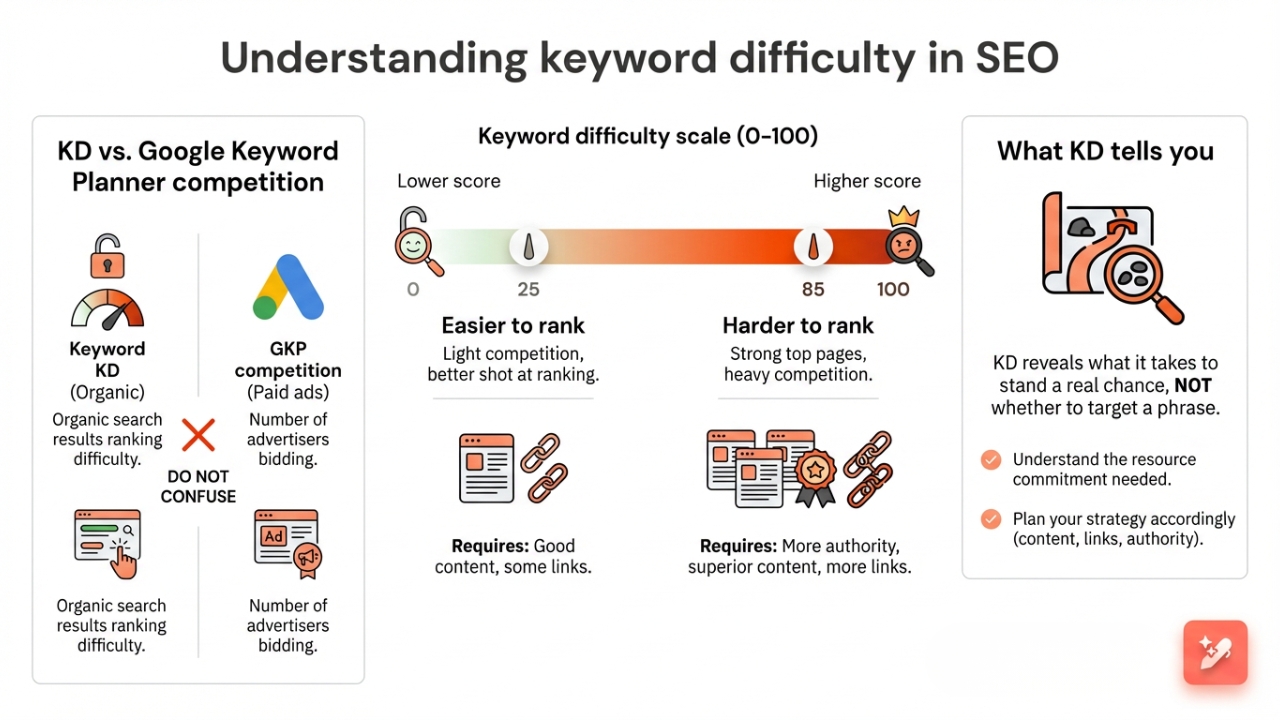
Keyword difficulty (KD) in SEO is a metric that shows how hard it is to rank for a specific search term in organic results. Most keyword research tools score this on a scale from 0 to 100.
A lower keyword difficulty score means the competition is light, and you have a better shot at ranking. A higher score means the current top pages are strong, so you need more authority, better content, and usually more links to win.
Many people confuse KD with the Competition column in Google Keyword Planner. That competition metric covers paid ads only and shows how many advertisers are bidding in Google Ads.
You may also see this metric called keyword competition or SEO difficulty. Whatever the label, KD does not tell you whether you should target a phrase; it tells you what it will take to stand a real chance.
How is keyword difficulty calculated, and why does it vary by tool?
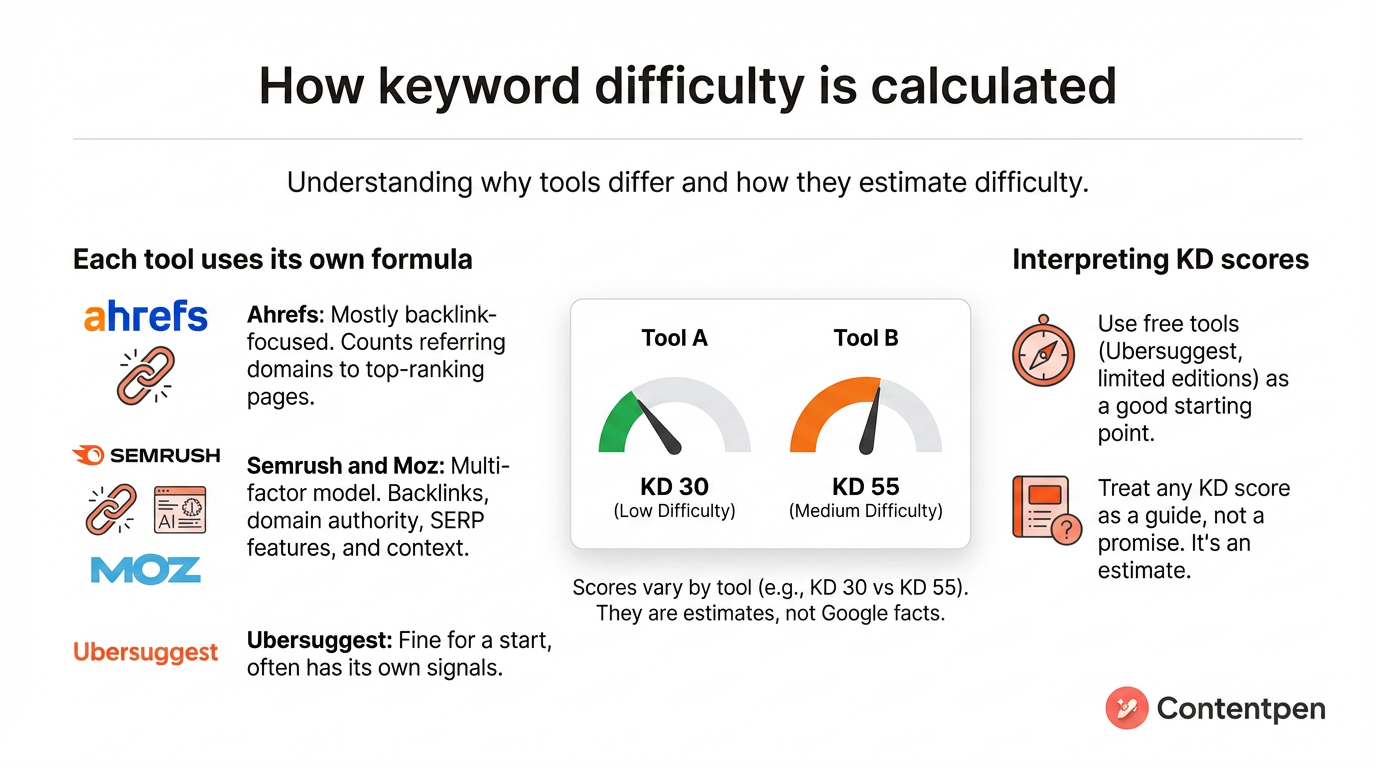
Here is where keyword difficulty gets confusing: every major tool uses its own formula. Tools such as Ahrefs, Semrush, Moz, and Ubersuggest track similar signals but weigh them differently.
That is why one keyword might look like KD 30 in one place and KD 55 in another. The number is not a fact from Google; it is an estimate based on each tool’s data.
Some tools use a mostly backlink-focused approach. For example, Ahrefs mainly looks at how many different websites link to the top-ranking pages for a term. If those top pages have a high count of strong referring domains, Ahrefs pushes the KD higher.
Others use a multi-factor model. Semrush and Moz still care about backlinks, but they also look at the authority of the domains on page one and what appears on the search results page for that particular term.
If Google is showing AI Overviews, featured snippets, shopping blocks, or a heavy local pack, it may treat that keyword as harder. They also consider context, such as branded phrases, which are often harder to outrank.
Free keyword difficulty checker options, such as Ubersuggest or limited editions from bigger tools, are fine for a start. Just remember that any KD score you see in a third-party tool is a guide, not a promise.
How to read keyword difficulty scores with scale breakdown
A common question is what a good keyword difficulty score is for a site like yours. The honest answer is that it depends on your situation.
A KD of 40 might be realistic for an established content brand, but out of reach for a new blog. Therefore, you want to look at the full keyword difficulty range and match it to your current authority level and resources.
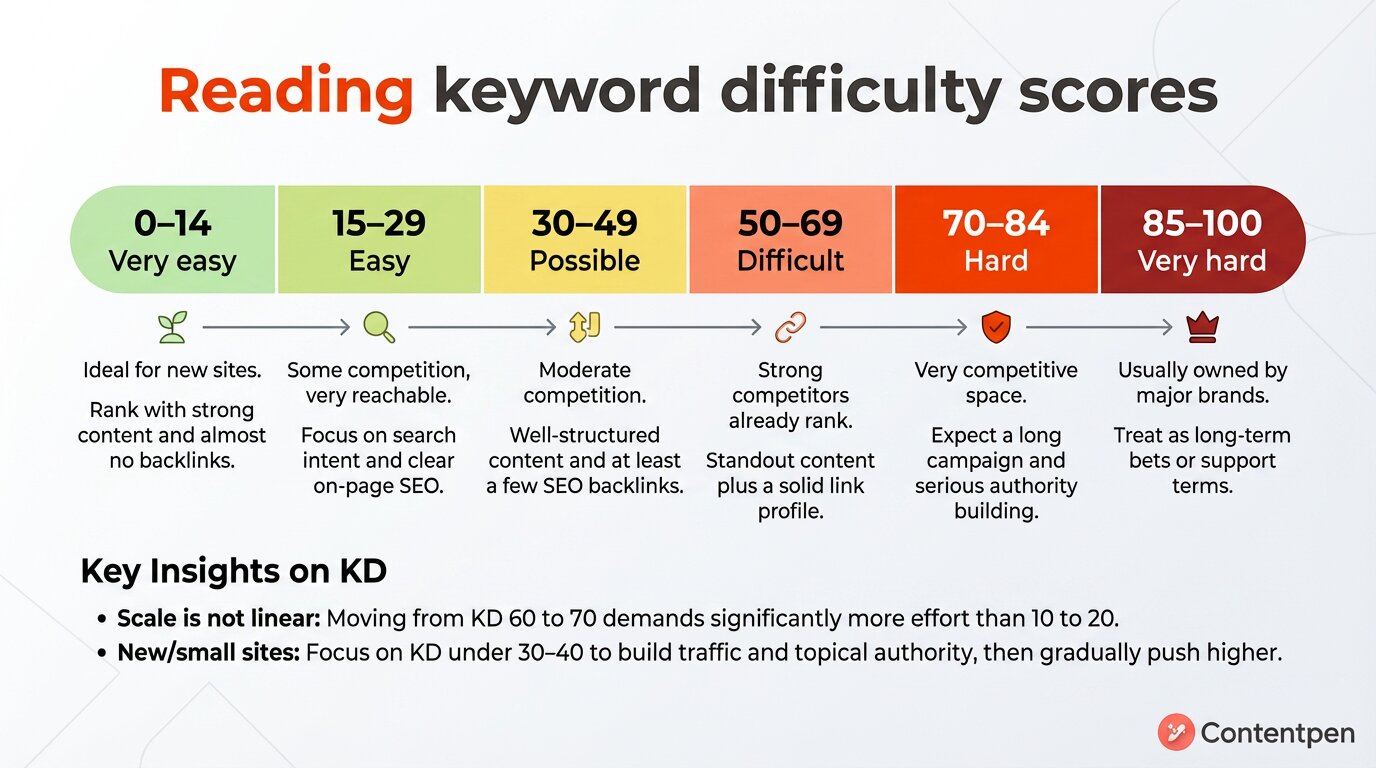
| KD score | Difficulty level | What does it mean for you |
| 0–14 | Very easy | Ideal for new sites. You can often rank with strong content and almost no backlinks. |
| 15–29 | Easy | Some competition, yet very reachable. Focus on matching search intent and clear on-page SEO. |
| 30–49 | Possible | Moderate competition. You need well-structured content and at least a few SEO backlinks. |
| 50–69 | Difficult | Strong competitors already rank. You need standout content plus a solid link profile. |
| 70–84 | Hard | Very competitive space. Expect a long campaign and serious authority building. |
| 85–100 | Very hard | Usually owned by major brands. Treat these as long-term bets or support terms. |
Remember, this scale is not linear. Moving from KD 10 to 20 might only need a few extra links and on-page tuning. While 60 to 70 can demand dozens of strong referring domains and a much longer content campaign.
If your site is new or still small, focus most of your SEO keyword research on KD under 30 – 40. These low-difficulty keywords help you pick up traffic, build topical authority, and start earning links.
As you grow, you can gradually push your targets upward and go after tougher phrases with higher keyword search volume.
How to estimate keyword difficulty manually (without a tool)
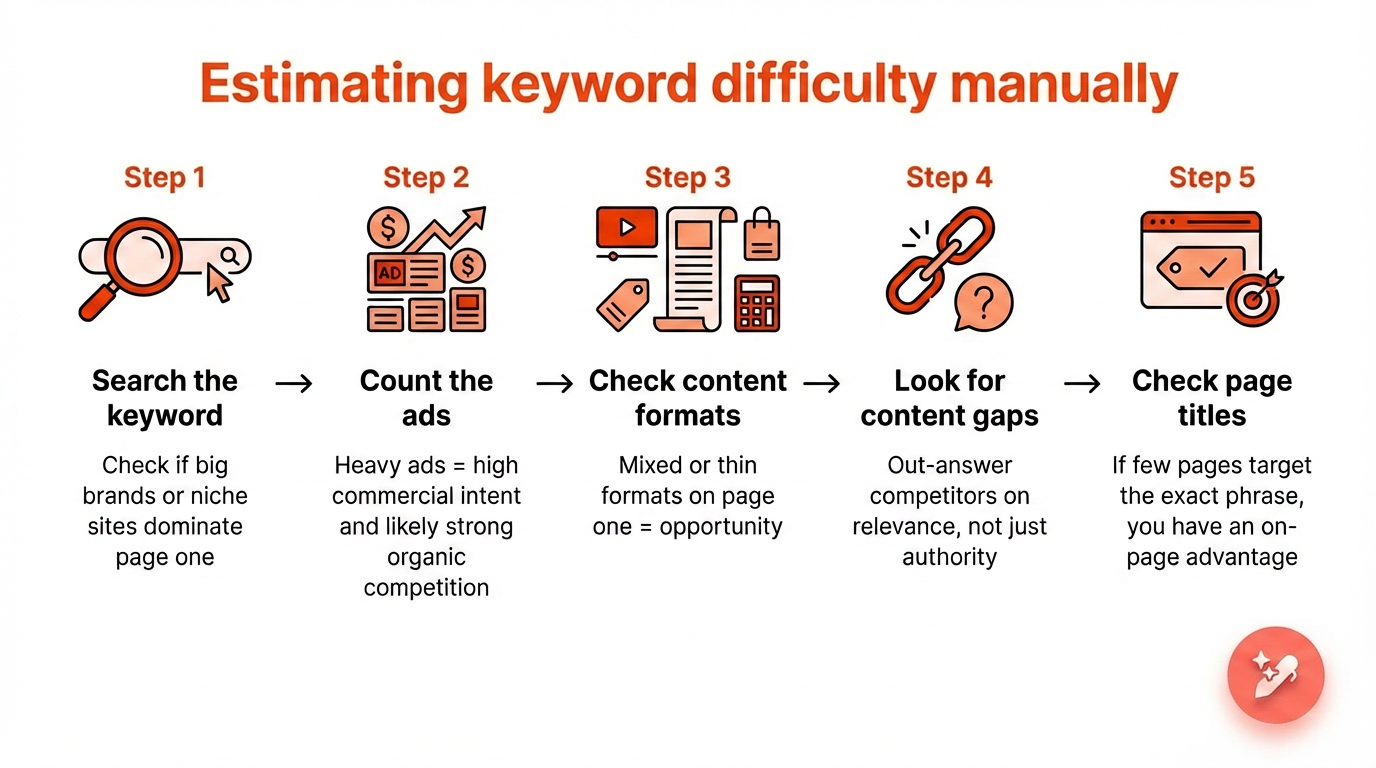
Keyword tools are helpful, but they are not always available, and they are never fully complete. Knowing how to read a keyword’s difficulty by hand is one of the most practical SEO skills you can build.
Here is a five-step manual process you can run directly from a Google search.
Step 1: Search the keyword and check who ranks
Type the keyword into Google without being logged in, ideally in a private or incognito window. Look at the first page results and ask: are these big brands, government sites, or well-known publications?
If the top five results are household names with no independent sites in sight, the keyword is likely harder than its KD score suggests. If you spot a few mid-size or niche sites in the top ten, that is a real signal that you can rank.
Step 2: Count how many ads appear
Check the top of the results page for paid ads. Heavy advertiser presence on a keyword usually means high commercial intent and, often, strong organic competition as well. No ads at all can mean lower competition or simply lower commercial value. Either way, it is a useful context before you commit.
Step 3: Check the content format on page one
Look at what type of content is ranking. Are they long guides, product pages, videos, tool pages, or short definitions?
If all ten results are in-depth guides from established domains, a thin post will not crack the top ten, regardless of how low the keyword difficulty reads.
But if the formats are mixed, or if some ranking pages are outdated or thin themselves, that inconsistency is an opportunity you can exploit with well-structured, current content.
Step 4: Look for content gaps in the top results
Skim the top 3 to 5 ranking pages. What questions are they not answering? What angles are they skipping? What has changed since they published?
If there is a clear gap, you do not need to outmuscle competitors on authority. You need to out-answer them on relevance. That is a winnable battle even for newer sites.
Step 5: Check page titles for exact keyword targeting
Look at the title tags of the ranking pages in the search results. Are they directly targeting the keyword you want to rank for, or are they ranking for it incidentally?
If most page titles do not include the exact phrase, you have a clear on-page advantage available to you without building a single link. Simply targeting the keyword intentionally in your title, meta description, and H1 already puts you ahead of pages that are not doing that.
Putting it together: A real keyword walkthrough
Let us apply all five steps to a real keyword so you can see how the process works in practice.
Keyword: “email marketing tools” Monthly search volume: 4900-4400 (US) KD (Ahrefs): 92 KD (Semrush): 68
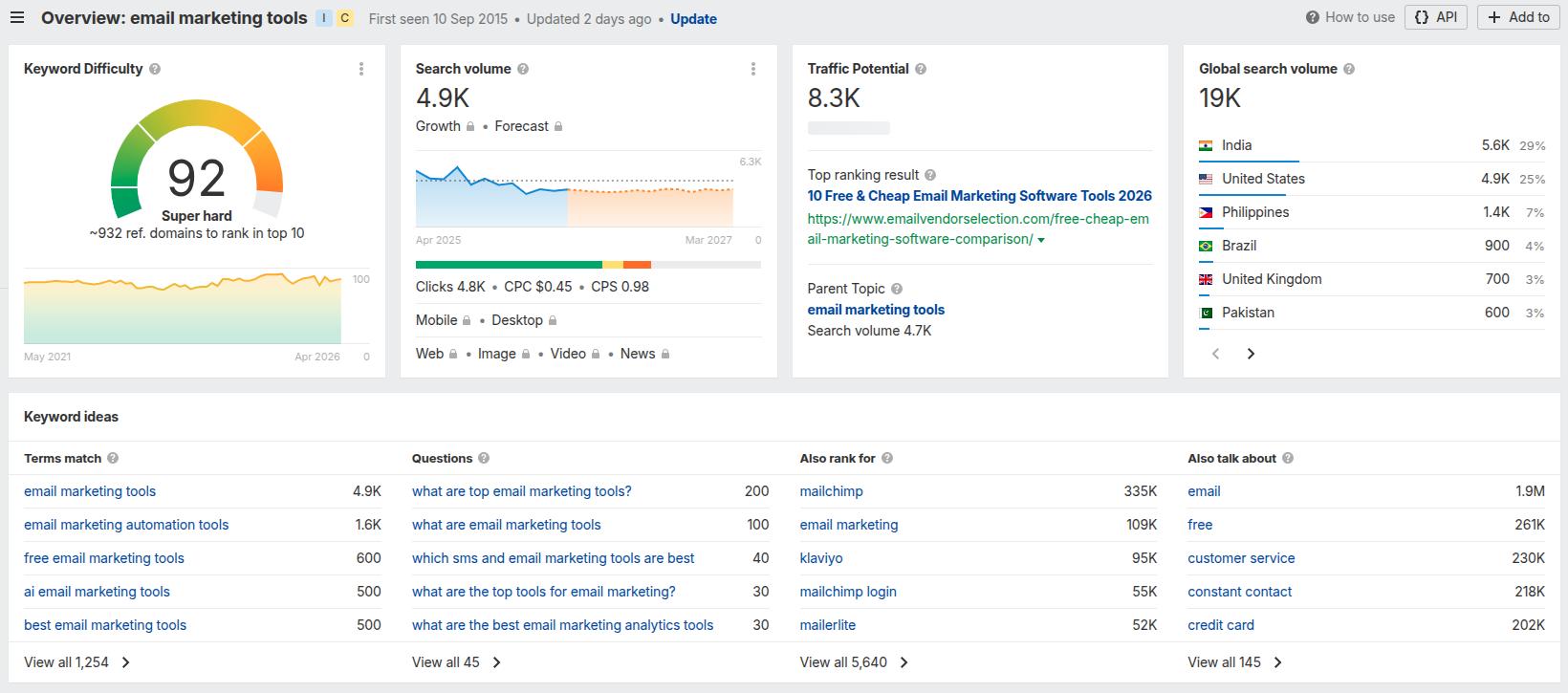
At first glance, this looks like a keyword to avoid. KD 92 in Ahrefs suggests you would need a significant number of referring domains just to reach the first page.
But here is what the manual check reveals.
Step 1 – Who ranks: The top results are a mix of large review platforms and established marketing blogs, such as Zapier. No government sites, no Wikipedia.
A few of the ranking pages belong to software companies ranking on their own brand authority rather than the strength of this specific page.
Step 2 – Ads: Two ads appear for this keyword: 1 from Zoho and the other from Clinch US. This manual SERP review signals strong commercial intent and advertiser competition.
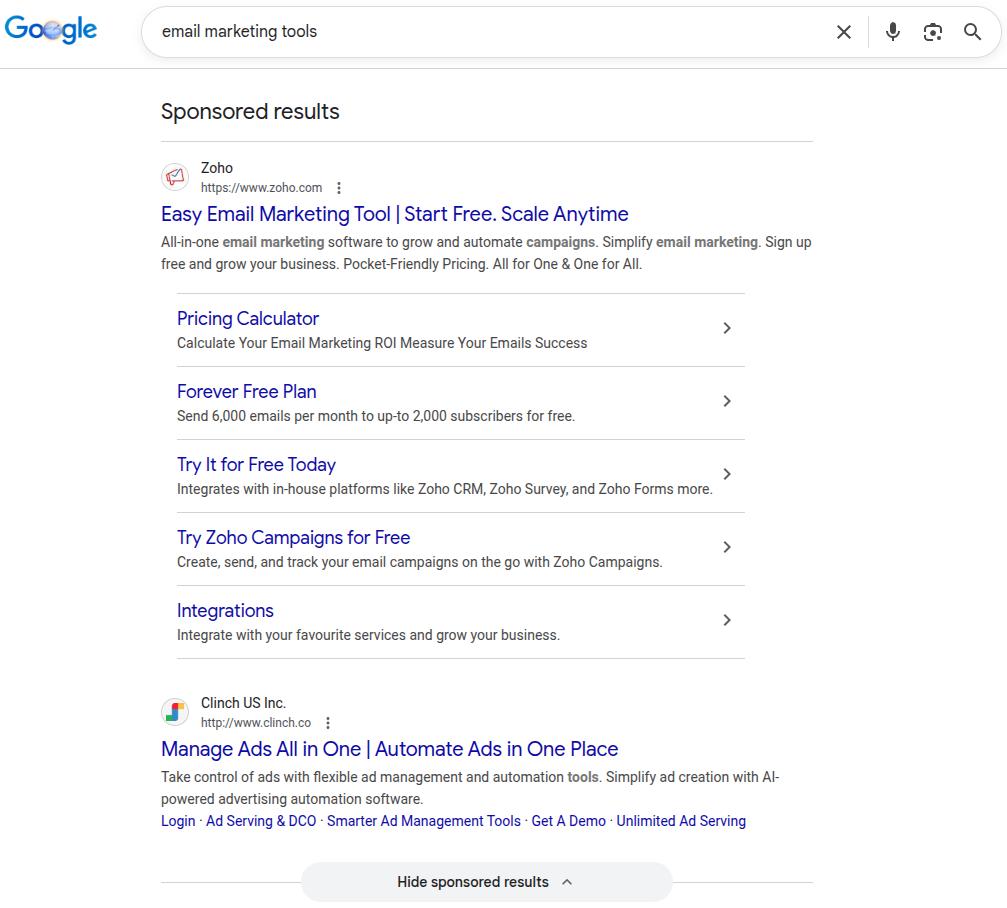
That confirms the keyword has buying-stage traffic worth targeting, but it also confirms you are entering a competitive paid and organic space.
Step 3 – Content format: Most of the top ten results are listicles or comparison roundups. Not guides, opinion pieces, or tutorials.
If you published a “What is email marketing” style article targeting this keyword, it would not rank, regardless of how well-written it is. You need a comparison post.
Step 4 – Content gaps: Several top-ranking pages do not cover AI-native tools in that much depth.
Also, the maximum number of tools covered on page one is 17, by EmailTooltester. This means you can win on content depth by covering more email marketing tools than the other pages (18 or 20 tools on the list).
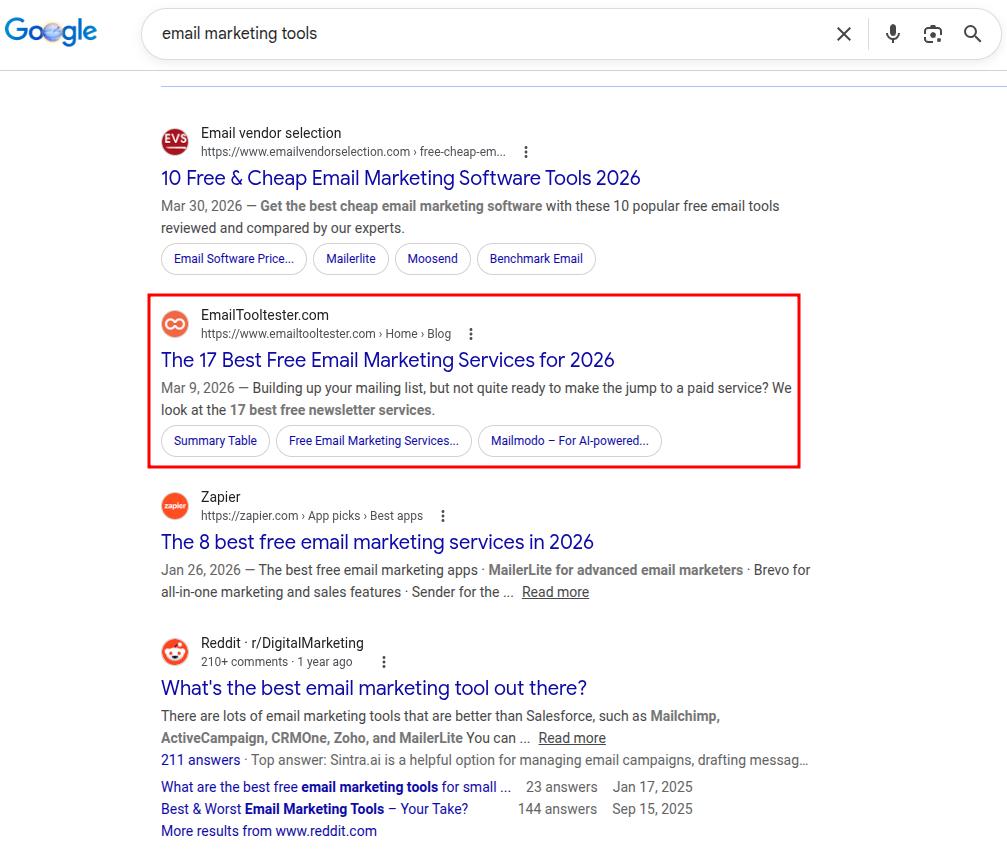
Step 5 – Title targeting: 7 of the top 10 results do not include the exact phrase “email marketing tools” in their title tag. That is a direct on-page opportunity available to any page that targets the phrase intentionally.
What this tells you: The KD score of 92 is accurate in one sense. The backlink profiles of ranking pages are strong.
But the SERP itself has weaknesses. There are brand-authority rankings rather than content-authority rankings, and a gap in modern tool coverage.
A well-resourced site with topical authority in the email marketing space has a more realistic shot here to rank than the raw keyword difficulty score suggests.
This is exactly why you always run the manual check. The SERP results tell you whether the effort is worth it and where to aim for an SEO keyword.
Keyword difficulty vs. keyword competition vs. CPC: What each term tells you
These three terms show up together constantly in keyword research, and they are often treated as versions of the same thing. They are not. Using them interchangeably can often lead to poor targeting decisions.
You can understand these metrics with the table below:
| Metric | What it measures | Who calculates it | Organic relevance |
| Keyword difficulty (KD) | Organic ranking competition | SEO tools | Direct |
| Keyword competition | Paid ad bidding density | Google Keyword Planner | None |
| CPC | Advertiser cost per click | Google Ads / SEO tools | Indirect (signals intent) |
In short, use KD to decide if you can rank. Use CPC to decide if it is worth ranking. Use competition only if you are running paid campaigns.
When all three point in the same direction, that keyword deserves to be at the top of your content strategy.
If these or any other metrics in your keyword research start to blur together, our SEO glossary keeps every definition in one place.
Also read: SEO keywords examples worth studying in 2026.
How to use keyword difficulty in your SEO strategy
Now that you understand what keyword difficulty is, the real value comes from how you use it in your content plan.
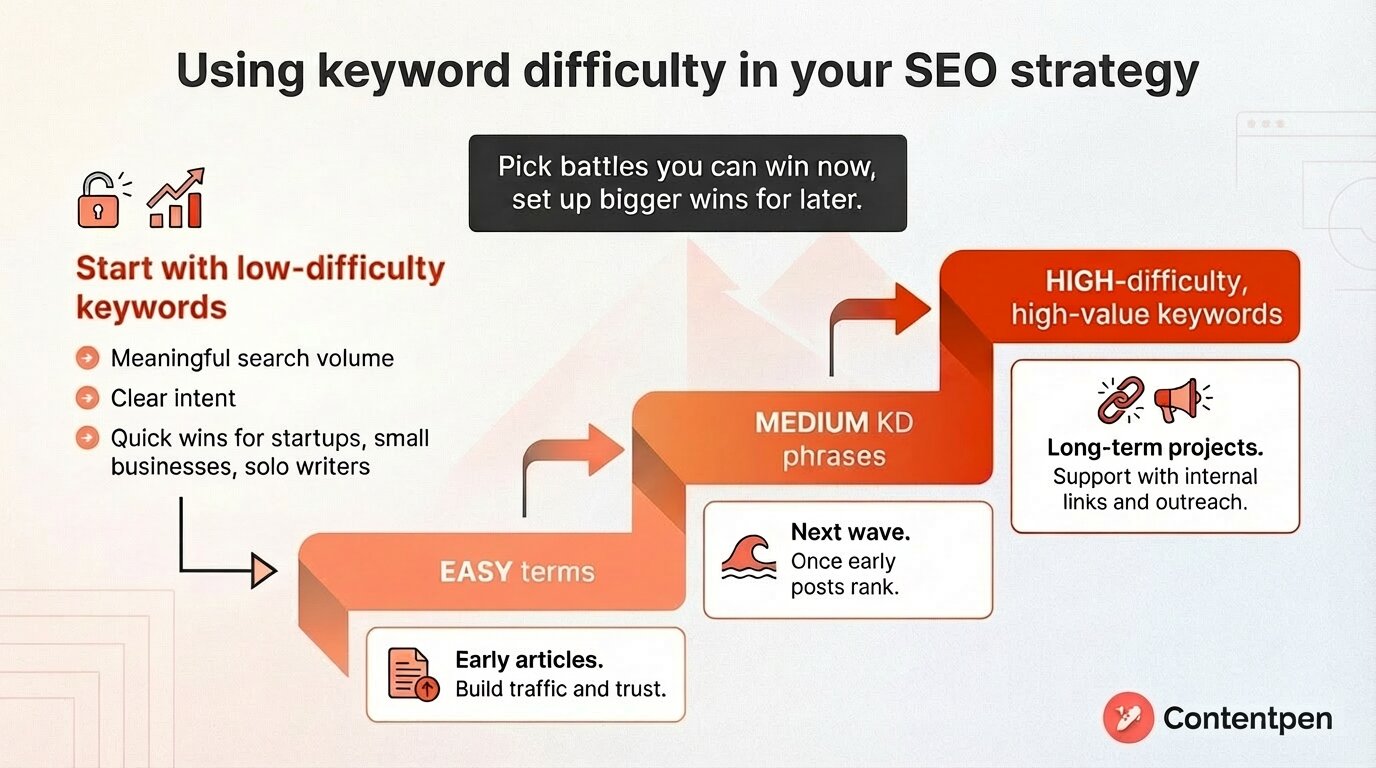
Making and implementing an SEO strategy is about picking battles you can win now while setting up bigger wins for later.
You should start with low-difficulty keywords that still have meaningful search volume and clear keyword search intent. These quick wins let you publish focused content and see movement faster, even without many links.
This approach suits startups, small businesses, and solo writers who need organic traffic without large budgets.
Next, group keywords by difficulty level and build a content roadmap:
- Easy terms become early articles that build traffic and trust.
- Medium KD phrases form your next wave once those early posts start to rank.
- High-difficulty, high-value keywords become long-term projects that you support with internal links and outreach.
You can also use KD scores to decide where SEO fits alongside paid ads.
Finding your opportunity zone keywords using Contentpen
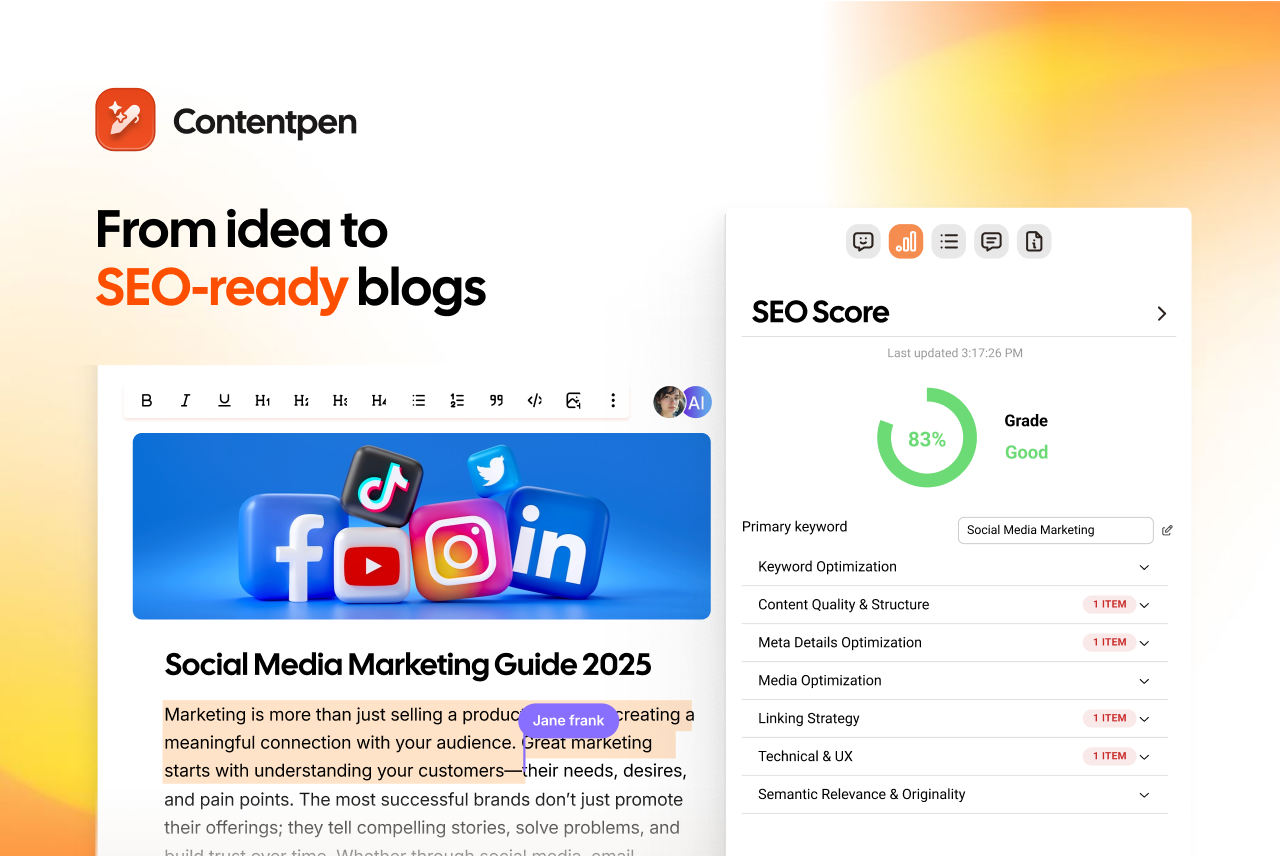
Instead of filtering keywords by keyword difficulty alone, filter by what experienced SEOs call the opportunity zone.
The opportunity zone is where KD is manageable, intent is commercial or informational, search volume justifies the effort, and the pages currently ranking are weaker than they should be.
In Contentpen, you can surface these types of keywords without switching tools or tabs. The dashboard shows KD, monthly search volume, CPC, and intent classification for each term.

Automated keyword research
Work on keywords worth writing for
Get search terms with real ranking potential, not just high volume.
Try Keyword Research for FREE →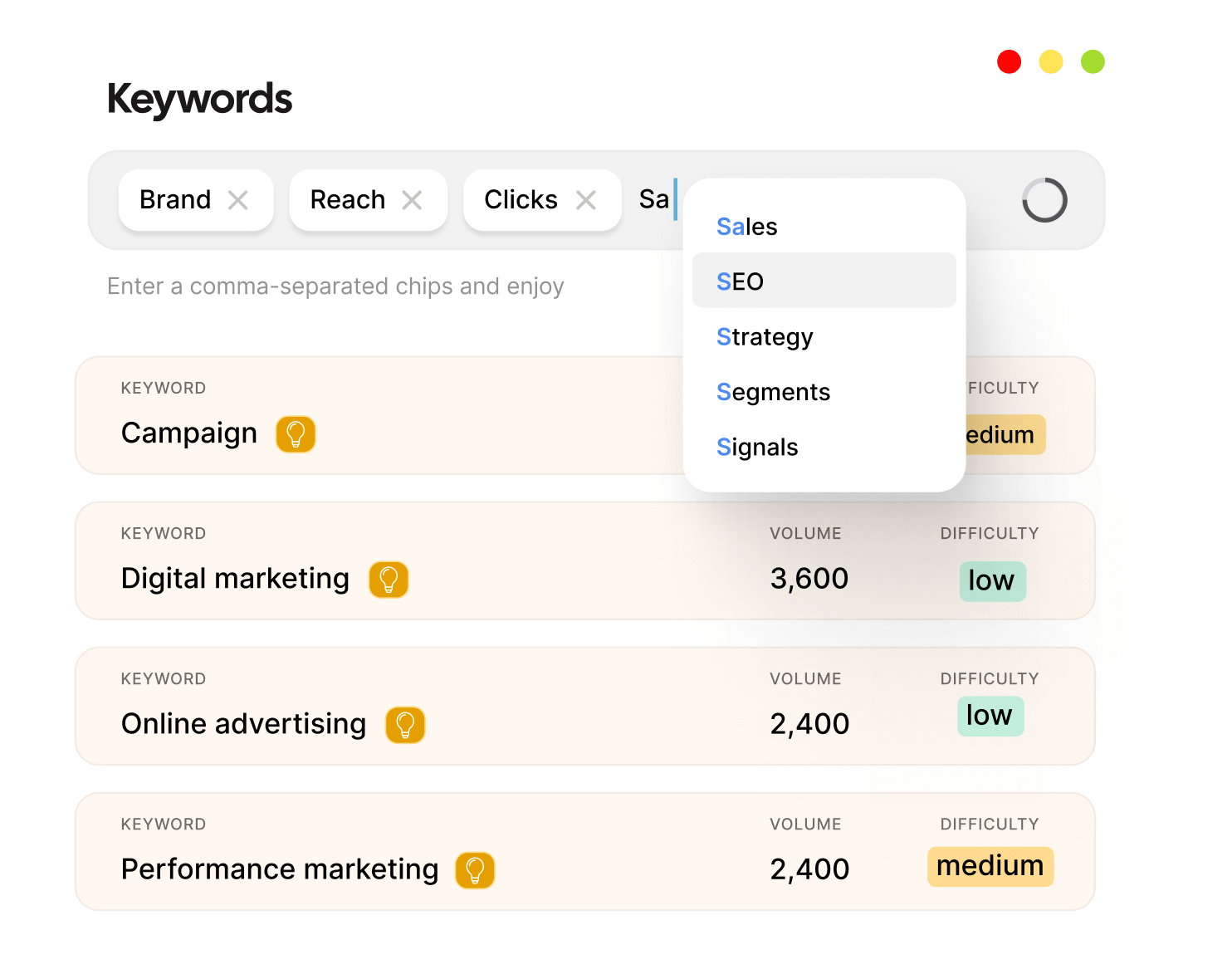
Our SEO AEO tool allows you to target the opportunity zone phrases by creating content that ranks and publishing seamlessly through its CMS integrations.
There’s also an option to view the SEO opportunities dashboard, which helps optimize content after publishing to maintain SERP positions.
Keyword difficulty in 2026 and beyond
A KD score tells you how competitive the organic results are. What it does not tell you is how many of those organic clicks you will actually receive if you rank.
That distinction matters more than ever now that Google’s AI Overviews appear more frequently in search results.
When an AI Overview appears at the top of a results page, it answers the user’s question directly before they ever reach the organic listings.
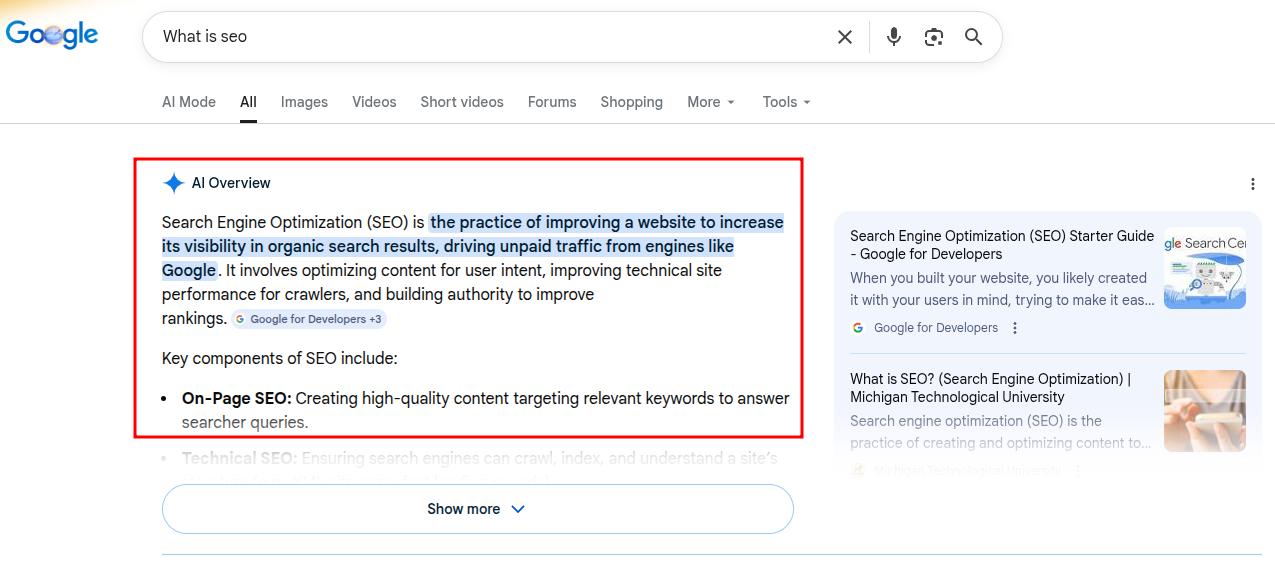
Pages ranking in positions 1 – 5 can see significantly lower click-through rates than a year ago, simply because the user’s question was already answered above the fold.
What this means in practice is that certain keywords are effectively harder than their KD score suggests. So, you need to know how to adjust your keyword difficulty thinking for this reality.
#1: Check the SERP before you commit
Search the keyword yourself and see what the results page actually looks like. Is there an AI Overview? A featured snippet? A People Also Ask block taking up half the screen?
Every one of these features absorbs clicks that would otherwise go to organic results. The more features present, the harder the keyword is in practice, regardless of what the keyword difficulty number says.
#2: Prioritize keywords where organic results still lead
Not every search triggers AI Overviews. Highly specific queries, tool-focused searches, and transactional queries are less likely to produce an AI Overview because they require nuance, personal context, or recency that a generated summary cannot reliably provide.
These keyword types still deliver strong organic click-through rates, and they are often exactly the intent categories you should target.
#3: Use AI Overviews as a citation opportunity
If an AI Overview consistently appears for a keyword you want to rank for, your goal shifts slightly.
Instead of only aiming for position one in traditional organic results, you also aim to be cited inside the AI Overview itself.
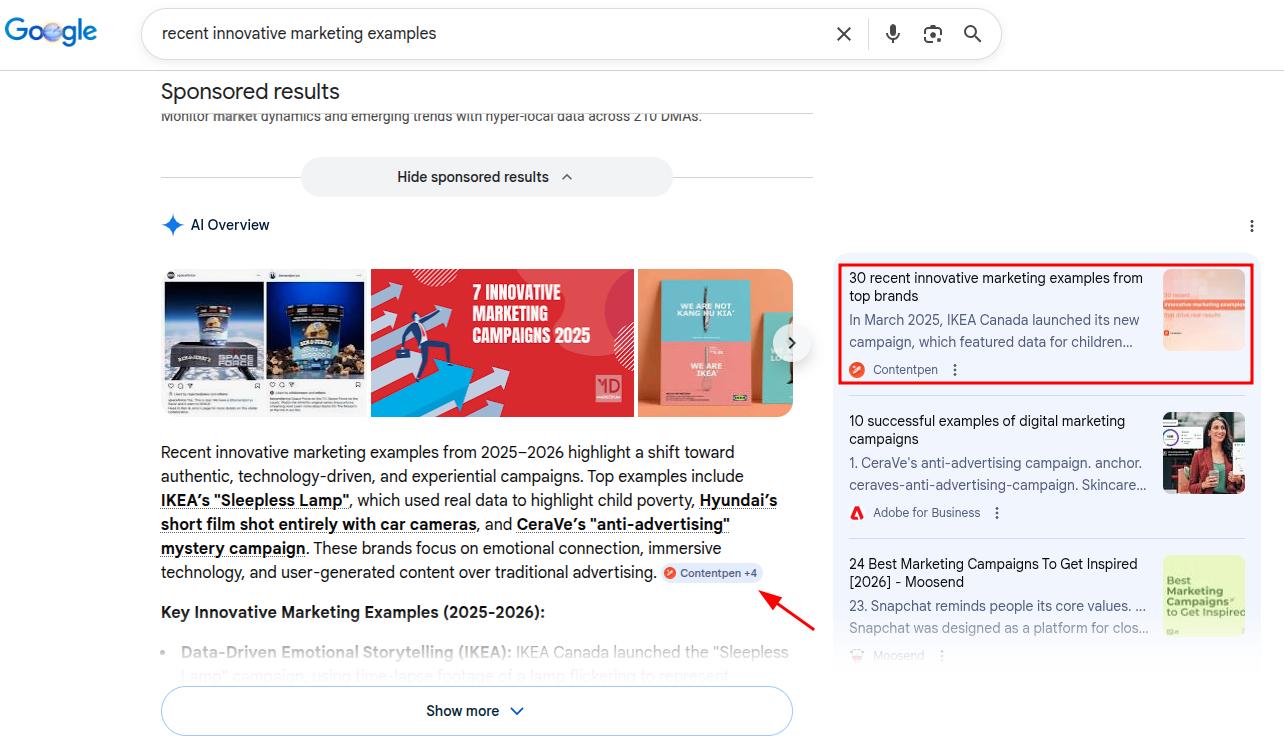
Google tends to cite pages that are comprehensive, clearly structured, and directly answer the query within the first few paragraphs. Publishing content that meets those standards gives you two shots at visibility on the same results page.
Final thoughts
Keyword difficulty does not exist to scare you away from keywords. It gives you a clearer picture of what each target may cost in time, content effort, and links.
There is no single perfect keyword difficulty range for everyone, because the right targets depend on your current authority, niche, and resources.
Begin with easier terms, do real SERP research, and grow into tougher keywords as your site gains strength.
If you want help turning that plan into content that ranks, then let Contentpen do the heavy lifting. From keyword competition analysis to gap discovery, it helps you pick the right battles and publish content that stands out with ease.