 11 minutes
HowTo schema is structured data for step-by-step instructions. It tells search engines what a guide helps you do, what you’ll need, how long it takes, and the order of every step, in code that machines can read without guessing.
Here’s the catch. Google stopped showing HowTo rich results in September 2023. The markup still validates, but it no longer changes how your page looks in Google. So the real question isn’t only how to add it. It’s whether it’s still worth your time.
This post covers everything about HowTo schema, including what changed, where it should still be used, and how to write it properly.
Table of contents
- Key takeaways
- What does HowTo schema actually mark up?
- What happened to HowTo rich results?
- Should you still add HowTo schema?
- HowTo schema example: Repotting a houseplant
- How to add HowTo schema to a page
- Does step-by-step markup help with AI answers?
- Already have the markup? Here’s what to do with it
- Final thoughts
- Frequently asked questions
Key takeaways
- HowTo schema marks up step-by-step instructions using schema.org’s HowTo type, built from steps, supplies, tools, and time.
- Google dropped HowTo rich results from mobile in August 2023 and from desktop on September 13, 2023.
- Recipes still earn rich results, and their steps use HowToStep inside Recipe markup.
- For most written guides, Article schema and clear numbered steps on the page do more work than HowTo markup.
- Test HowTo markup in the Schema Markup Validator, since Google’s Rich Results Test no longer checks it.
What does HowTo schema actually mark up?
HowTo schema is a type of schema markup that works as a label for instructions for both readers and search engines.
Schema.org defines HowTo as “Instructions that explain how to achieve a result by performing a sequence of steps.” The word that matters most is sequence. The order counts, and each step builds on the one before it.
On a typical how-to page, the pieces map like this:
| Part of your guide | HowTo property | Example |
|---|---|---|
| The guide’s title | name | How to do an SEO audit |
| Things you use up | supply (HowToSupply) | List of target keywords |
| Things you reuse | tool (HowToTool) | Contentpen |
| How long it takes | totalTime | PT2H (takes 2 hours to do the process) |
| What it costs | estimatedCost | About $29 |
| Each instruction, in order | step (HowToStep) | E.g., Connect Contentpen to your Google Search Console |
Supplies and tools trip people up the most. If you use anything up or if it becomes part of the result, it’s a supply. If you put it back to use it again for some other tasks, it’s a tool.
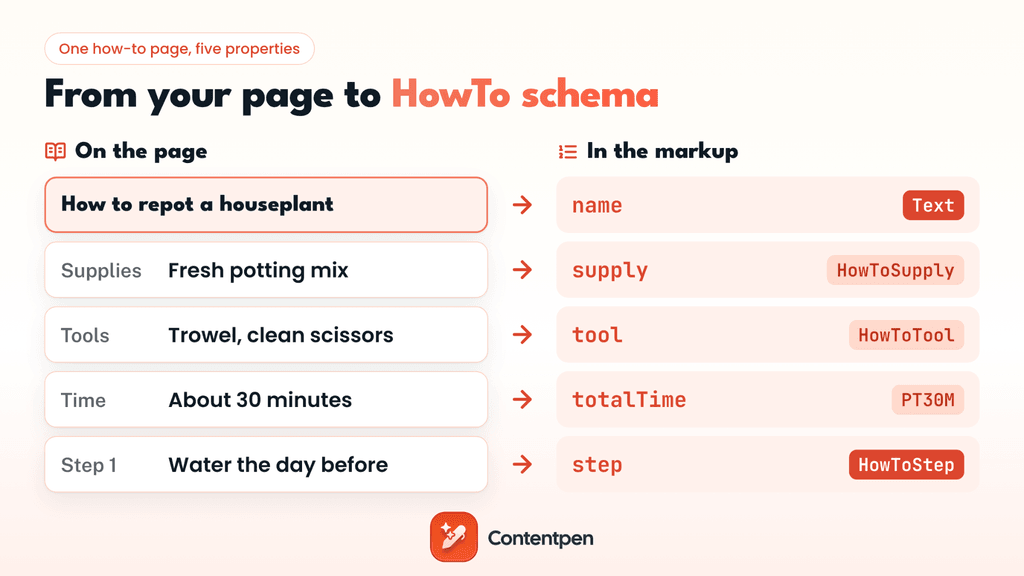
Steps have a few building blocks of their own:
- HowToStep: One action, with a short name, the full instruction, and optionally an image and a link to that step on the page.
- HowToSection: A named group of steps, like “Prepare the plant” and “Repot it,” for longer guides that already use subheadings.
- HowToDirection and HowToTip: These split a single step further, like “Don’t pack the soil tight” in case of the plant repotting example.
Most guides only need HowToStep. Use HowToSection and HowToTip only when your page already shows them.
What happened to HowTo rich results?
For a few years, this markup could turn a plain blue link into a numbered list of steps, sometimes with images. Then Google started simplifying its results page, and HowTo was one of the first features to go:
- August 2023: Google stops showing HowTo rich results on mobile.
- September 13, 2023: They disappear from desktop too, and Google calls the result type deprecated.
- September 14, 2023: Google removes the How-to documentation from Search Central.
- Within 30 days: The How-to report in Search Console and support in the Rich Results Test go away.
- May 7, 2026: FAQ rich results follow, so neither half of that 2023 pair shows in Google anymore. Our guide to FAQ schema covers that change.
Google’s John Mueller summed it up a day after the desktop removal: “You can keep the structured data; it just won’t do much for Google.” Plenty of sites took him at his word. But Schema.org still counts HowTo on 100,000 to 1 million domains, nearly three years after the rich result disappeared.

Should you still add HowTo schema?
Yes. HowTo and FAQ lost their rich results, but Google’s list of supported features still has 25 entries, from Article and Recipe to Video and Product schema. Choosing the right types of schema markup matters more now than adding every type you can find.
Here’s where each kind of guide stands in 2026:
| Your content | Best markup | Why |
|---|---|---|
| Recipes | Recipe, with each step as a HowToStep | Recipe rich results still show, and Google recommends HowToStep for the instructions. |
| Video tutorials | VideoObject | Video features are still on Google’s supported list. |
| Step-by-step blog posts | Article schema, with HowTo optional | Article is still supported. HowTo adds a clean step list for anything else that reads your code. |
| Help-center and setup guides | HowTo, if your CMS adds it for you | Google won’t display it, but it costs nothing when it’s automated. |
| Tips, ideas, and listicles | No HowTo | “10 ways to cut your energy bill” isn’t a sequence, so it isn’t a how-to. |
Recipes are the interesting case. On schema.org, Recipe is a subtype of HowTo, so its instructions still use HowToStep. If you publish recipes, HowTo-style steps are very much alive.
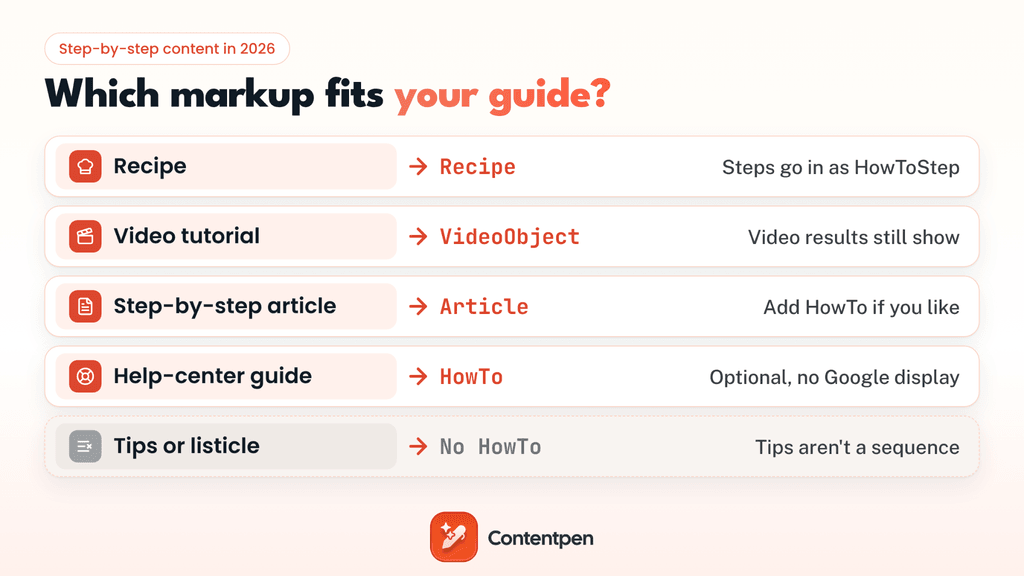
For everything else, the honest answer is to add HowTo markup only when it’s done for you.
If your plugin or CMS builds it from steps you already write, leave it on. If it requires a developer or a person to hand-code markup for every guide, then put that time into the guide instead.
HowTo schema example: Repotting a houseplant
Here’s a complete example you can copy and adapt to. It marks up a short plant repotting guide with supplies, tools, time, cost, and six steps:
| <script type=”application/ld+json”> { “@context”: “https://schema.org”, “@type”: “HowTo”, “name”: “How to repot a houseplant”, “description”: “Move a rootbound houseplant into a bigger pot in about 30 minutes.”, “totalTime”: “PT30M”, “estimatedCost”: { “@type”: “MonetaryAmount”, “currency”: “USD”, “value”: “15” }, “supply”: [ { “@type”: “HowToSupply”, “name”: “Fresh potting mix” }, { “@type”: “HowToSupply”, “name”: “A pot 1 to 2 inches wider, with drainage holes” } ], “tool”: [ { “@type”: “HowToTool”, “name”: “Trowel” }, { “@type”: “HowToTool”, “name”: “Clean scissors” } ], “step”: [ { “@type”: “HowToStep”, “name”: “Water the plant the day before”, “text”: “Water the plant a day ahead so the root ball holds together and slides out more easily.”, “url”: “https://www.example.com/repot-a-houseplant#step-1” }, { “@type”: “HowToStep”, “name”: “Ease the plant out”, “text”: “Turn the pot on its side, support the base of the stems, and slide the plant out. Tap the sides of the pot if it sticks.”, “url”: “https://www.example.com/repot-a-houseplant#step-2” }, { “@type”: “HowToStep”, “name”: “Loosen and trim the roots”, “text”: “Gently tease apart roots that circle the root ball, and snip off any that are dark, mushy, or dry.”, “url”: “https://www.example.com/repot-a-houseplant#step-3” }, { “@type”: “HowToStep”, “name”: “Add fresh mix to the new pot”, “text”: “Pour in enough potting mix that the top of the root ball sits about an inch below the rim.”, “url”: “https://www.example.com/repot-a-houseplant#step-4” }, { “@type”: “HowToStep”, “name”: “Set the plant and fill around it”, “text”: “Center the plant, fill the gaps with mix, and press lightly to remove air pockets without packing the soil tight.”, “url”: “https://www.example.com/repot-a-houseplant#step-5” }, { “@type”: “HowToStep”, “name”: “Water until it drains”, “text”: “Water slowly until it runs out of the drainage holes, then let the pot drain fully before putting it back.”, “url”: “https://www.example.com/repot-a-houseplant#step-6” } ] } </script> |
A few choices here are worth copying:
- Each step starts with a verb: “Water,” “Ease,” “Loosen.” Short names that open with an action word read cleanly wherever they show up.
- Every step links to itself: The URL points to an anchor on the page, like #step-3, so any machine reading the markup can send people straight to that step.
- Time and cost use standard formats: totalTime uses ISO 8601, so PT30M means 30 minutes, and estimatedCost carries a currency code.
- Nothing is invented: Every supply, tool, and step in the code appears on the page, in the same order.
Swap in your own guide and make the changes accordingly. For other schema types written the same way, browse our schema markup examples.
How to add HowTo schema to a page
These five steps below cover how to add HowTo schema to a page.
- Write the steps on the page first: Use a numbered list or step headings, with one action per step. Readers follow the page, and the markup only describes it.
- Give each step an anchor: Add an id to every step, like id=”step-1″, so the URL in your markup can point to it.
- Generate the markup: On WordPress, Rank Math and Yoast both present HowTo blocks that you fill in with your steps. These plugins will generate the JSON-LD code automatically for you.
- Match every detail: The step count, order, wording, supplies, and time in the code should mirror the page. When you edit a step, edit the markup with it.
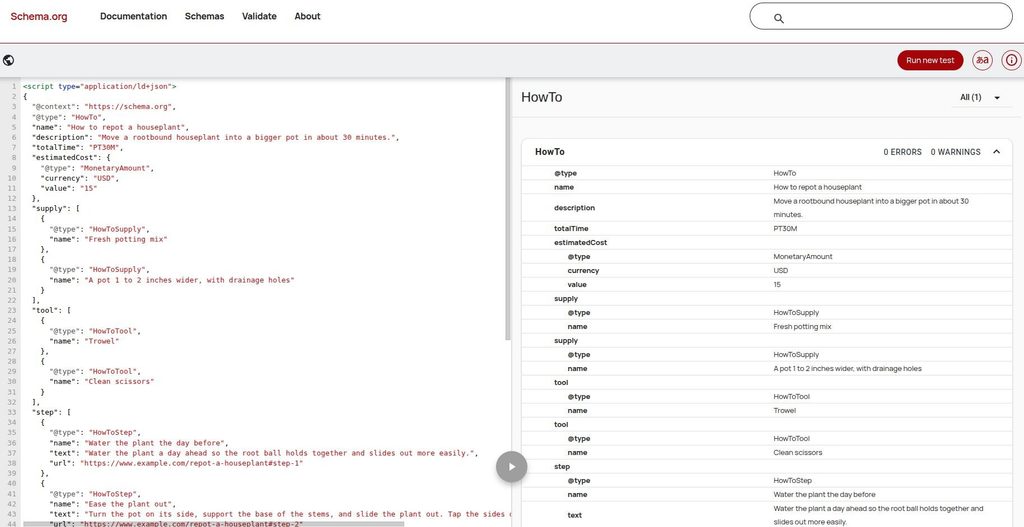
- Validate it: Paste your URL or code into the Schema Markup Validator. Skip the Rich Results Test here, since Google removed HowTo support from it in 2023.
And that’s it! Remember, creating the HowTo code is not the hard part. Writing steps clear enough that someone can follow them is.
Here’s our repotting HowTo schema validated from Schema Markup Validator:
If you publish guides at volume, that writing is the part worth handing off. Contentpen is an SEO and AEO tool in one, with AI agents that research, write, and publish SEO and GEO-optimized articles. It helps your team spend time planning strategies, while you execute them on autopilot.
Does step-by-step markup help with AI answers?
Not in any way anyone has measured. Google says its AI Overviews don’t need any special schema, and when Ahrefs tracked 1,885 pages that added JSON-LD, their AI citations barely moved.
What AI answers do reward is a clean sequence. Ask Google how to repot a houseplant, and the AI Overview lays the steps out in order, pulled from pages that wrote them clearly.
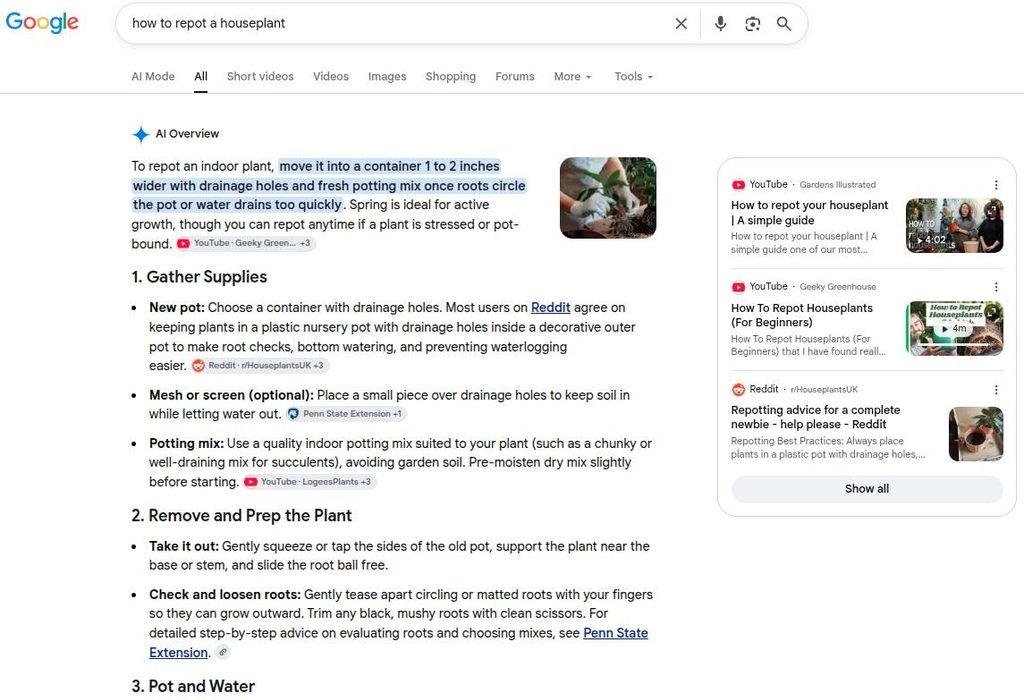
That’s the part you control: numbered steps, one action each, with the reason sitting right next to the instruction. Our guide to schema markup for AI search covers what the research shows about markup itself.
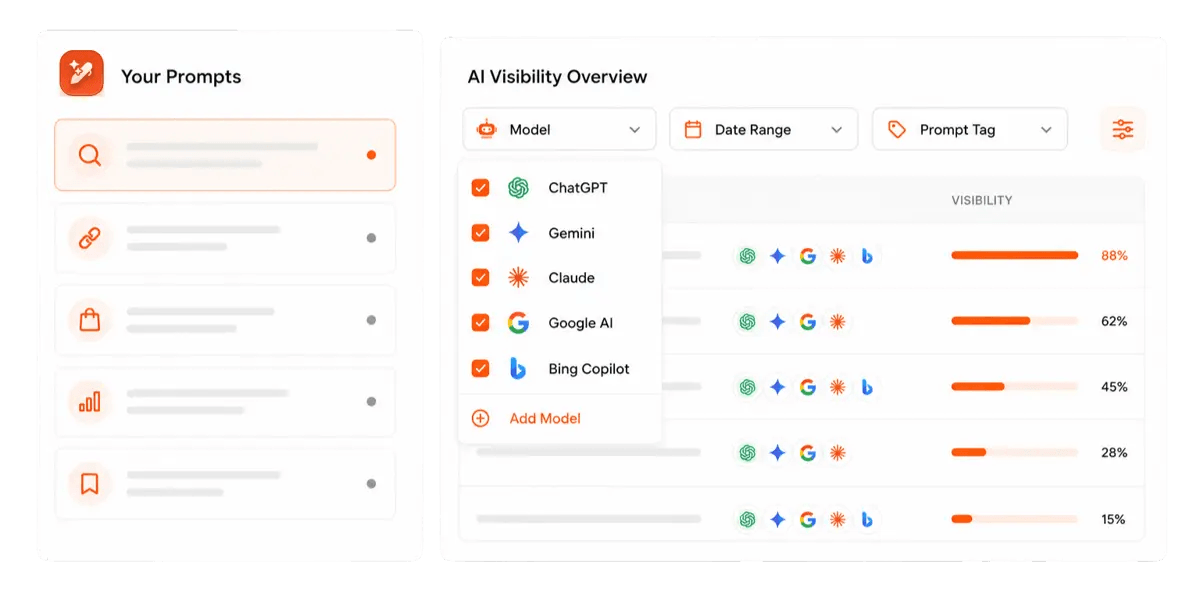
To see whether your own guides show up in those answers, Contentpen’s AI visibility tool tracks the prompts your customers are likely to ask across AI engines like ChatGPT, Gemini, and Google AI Mode, and shows which sources get cited.

Find your brand in AI search

Track AI citations, share of voice, and brand sentiment
Find the top sources driving citations
Already have the markup? Here’s what to do with it
Nothing urgent. Google simply ignores markup it no longer uses, so the code already on your pages won’t hurt you. A quick check is still worth it, though:
- Keep it if it’s accurate and a plugin maintains it for you.
- Fix it if the steps in the code no longer match the page.
- Remove it if it marks up content that isn’t a real sequence, like a tips list.
- Add Recipe or VideoObject markup where the content fits, since those still earn results in Google.
And if your how-to pages lost traffic around the time the rich result went away, the markup isn’t the fix. The content is.
You need to update the steps, answer the follow-up questions people ask, and make the page the best answer for its search.
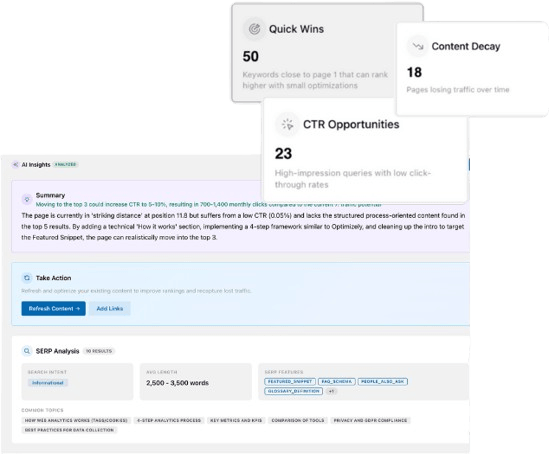
Contentpen’s SEO opportunities can show you where to start. It checks your site every 14 days and flags pages that are losing clicks under Content Decay, so you know which guides to refresh first.
Turn existing content into growth opportunities
Identify pages losing traffic or CTR
Find quick wins to improve clicks and rankings
Final thoughts
HowTo schema had a good run. For a few years, it turned plain links into step-by-step cards, and plenty of sites built whole content plans around that.
Losing it stung, but it never changed what makes a how-to page useful: steps that work, in the right order, written for someone doing the task for the first time.
So write that page first. Add HowTo markup when your tools make it effortless, use Recipe or VideoObject where they fit, and put your real effort into writing the instructions. That’s what both people and AI answers end up rewarding.
If keeping a whole library of guides fresh sounds like a lot, it doesn’t have to be manual. Try Contentpen free for 7 days and let its AI agents handle the research and drafts for you.
Frequently asked questions
Pick the schema.org type that matches the page, write it in JSON-LD using only details visible on the page, add it to the page’s HTML or through your CMS, and test it in a validator. The process is the same for every type. Only the properties change.
It’s JSON-LD with the letters flipped. Structured data in JSON-LD sits inside a script tag with the type “application/ld+json,” which is where that spelling comes from. Google recommends JSON-LD over Microdata and RDFa whenever your setup allows it.
No. The example above covers most guides. A generator saves typing, but its output is only as good as the steps you feed it, so check it against your page before you publish.
Yes. A blog post can be an Article that also contains a HowTo. Just make sure both describe the same visible content, and keep the steps consistent between them.
Yes. Both HowTo and HowToStep accept a video property. If you want the video itself to appear in Google’s video features, though, give it its own VideoObject markup.

Jawwad
Jawwad Ul Gohar is an SEO and GEO-focused content writer with 3+ years of experience helping SaaS brands grow through search-driven content. He has increased organic traffic for several products and platforms in the tech and AI niche. As an author at Contentpen.ai, he provides valuable insights on topics like SEO technicalities, content frameworks, integrations, and performance-driven blog strategies. Jawwad blends storytelling with data-driven content that ranks, converts, and delivers measurable growth.
View all posts by this author