 15 minutes
Person schema is structured data that describes a real person, such as an author, founder, or expert, in a format search engines and AI tools can read directly. It spells out who they are, what they do, where they work, what they know, and which online profiles belong to them.
You add it to author pages, About pages, and the bylines on your posts, so every piece of content connects to the person behind it.
That matters more than it sounds. A byline that says “by admin” tells Google nothing about who wrote a post or why it deserves trust.
This guide shows where Google actually uses Person markup, which properties are worth filling in, a complete example you can copy, and how to add it on your site.
So, let’s get started.
Key takeaways
- A person schema describes one real person using schema.org’s Person type, usually an author, founder, or subject-matter expert on a topic.
- There’s no “Author” schema type. The author property simply points to a Person (or an Organization).
- Google doesn’t show a rich result for Person on its own. It reads Person details through Article bylines and through ProfilePage markup on author and About pages.
- Start with name, url, image, jobTitle, worksFor, and sameAs properties, and add credentials only when the page shows them too.
- Give each person one @id and reuse it on every page they appear on, so search engines see one person instead of several.
What is Person schema?
Person schema is the schema.org markup for describing an individual. Schema.org keeps the definition wonderfully broad: “a person (alive, dead, undead, or fictional),” so the same type covers a blog author, a company founder, a historical figure, or a character in a novel.
It’s also one of the most common types on the web. According to schema.org, more than 10 million domains have Person markup on them, based on Google’s web index.
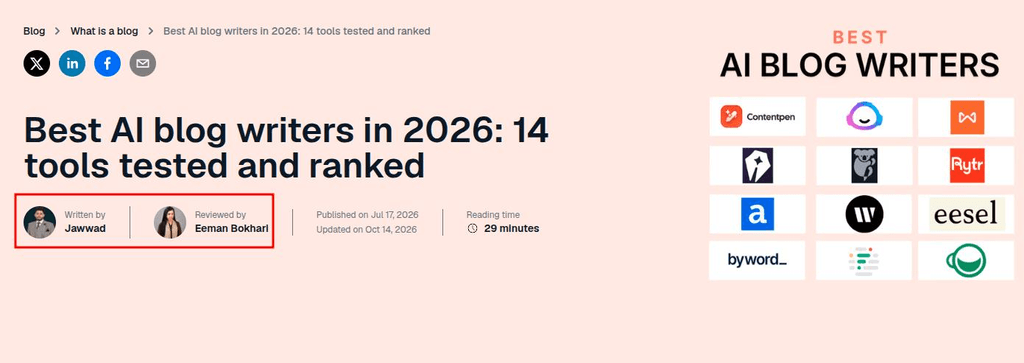
On your own site, you’ll mostly use it for the people behind your content, which include the writer in the byline, the founder on the About page, or the doctor who reviewed a health article. The markup turns what a reader sees in a bio into facts a machine can store, compare, and connect.
Person, author, or Organization schema?
Person and Organization are schema types, and they describe who someone is. The author property isn’t a type at all. It’s a field inside your Article markup that says who wrote the piece, and the name in that field is usually a Person.
The table below makes the difference easy to picture:
| What it is | Where it goes | |
|---|---|---|
| Person | A type that describes one individual | Author pages and About pages |
| author | A field inside Article schema | Every blog post and article |
| Organization | A type that describes a company or group | Homepage or About page |
So when you add author markup to a post, you’re really adding a Person to it. The next two sections show how that works, and when a business needs Organization instead.
What people mean by author schema
When people say “author schema,” they mean the author field in your Article markup. It answers one question: who wrote this post?
For a made-up writer named Marisol Quenneville, the field looks like this:
| “author”: { “@type”: “Person”, “name”: “Marisol Quenneville”, “url”: “https://www.example.com/authors/marisol-quenneville/” } |
That’s all author schema is: a Person tucked inside your article’s markup. Google’s author markup guidelines add three simple rules:
- Use the Person type for people, and Organization only when a company is the author.
- Put only the person’s name in the name field, with no job title or “Written by.”
- Add a url (or sameAs) property that leads to a page about the author, like their author page.
Follow those three and your bylines are covered. Our guide to Article schema explains the rest of the Article markup.
When to use Person or Organization schema
For this distinction, ask who your readers are really dealing with:
- Use Person when the brand is one individual, like a consultant, coach, or freelance writer who works under their own name.
- Use Organization schema when the business has its own name, like an agency, a magazine, or a software company, even if one person runs it.
Most business blogs need both: one Organization for the company and a Person for each writer, connected with the worksFor property. The full example later in this guide shows exactly how.
Where Google uses Person markup
Google doesn’t have a rich result for Person markup on its own, so adding it won’t change how a listing looks overnight. Google reads Person structured data in a few specific places instead.
#1: Article bylines
Every article’s author property points to a Person, which makes bylines the most common place Google meets Person markup. It’s also where authorship matters most.
Google’s people-first content guidance asks whether bylines “lead to further information about the author or authors involved,” and strongly encourages accurate authorship information wherever readers would expect it.
Person markup is how that background becomes machine-readable. The byline names the person, and the markup tells search engines which person that is.
#2: Author and About pages
Pages that exist to describe one person can carry ProfilePage markup, with the Person as its mainEntity. Google says the page’s primary focus must be a single person or organization affiliated with the site.
ProfilePage markup helps Google surface content from communities in search results, including its Discussions and Forums feature, so it matters most on community sites.
#3: Knowledge panels
Person markup can’t create a knowledge panel. Google says knowledge panels are generated automatically from information across the web. Consistent markup is one more source that agrees with the rest, nothing more.
#4: AI search
Google’s guide to its AI features says you don’t need special markup to appear in them, and the usual SEO basics apply.
Still, AI systems have to work out who said what before they quote anyone. So, consistent names, roles, and profiles across your markup, your bylines, and your social accounts make that easier.
Our guide to schema markup for AI search covers the wider strategy. If your name is your brand, keep an eye on your AI visibility too. Check whether ChatGPT, Perplexity, and Google’s AI Overviews mention you, and how they describe your work.

Find your brand in AI search

Track AI citations, share of voice, and brand sentiment
Find the top sources driving citations
The Person properties worth adding
Schema.org lists dozens of properties for Person schema, and some of the most useful ones are name, url, image, and sameAs.
Here’s how they map onto a typical author bio:

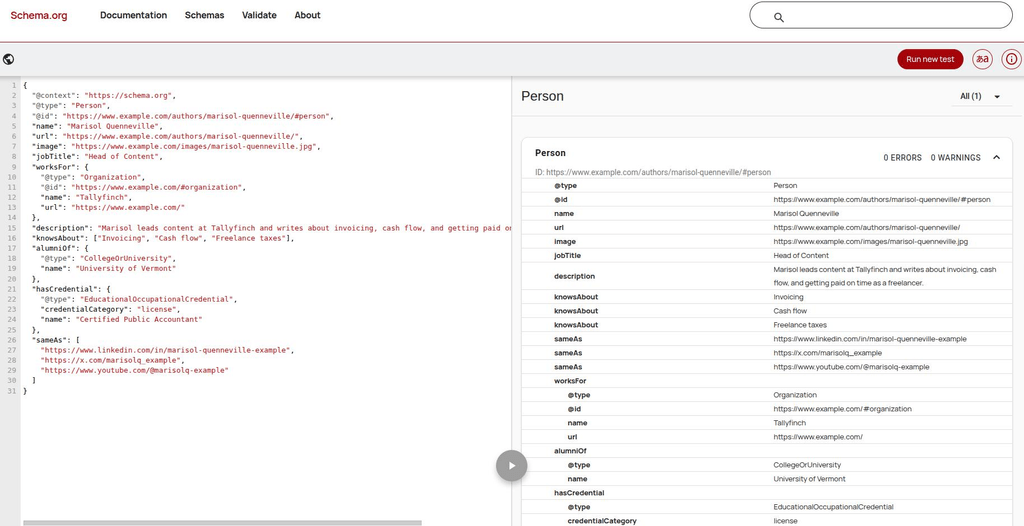
From the image, we can learn about a made-up person called “Marisol Quenneville” who works as “Head of Content” at a company “Tallyfinch.”
Let’s try and understand a bit more about these properties:
Who the person is
| Property | What to put in it |
|---|---|
| name | The name exactly as it appears in the byline |
| alternateName | A nickname, maiden name, or pen name readers also know |
| honorificPrefix and honorificSuffix | Titles like “Dr.” and letters after a name, like “PhD” or “CPA” |
| image | A full URL to a real, current headshot |
| url | The person’s author page or personal website |
| description | A one- or two-sentence bio |
Keep the name field clean. “Marisol Quenneville” works, while “Marisol Quenneville, CPA, Head of Content” crams three properties into one.
What they do and know
- jobTitle: The person’s current role, such as “Head of Content.”
- worksFor: The organization they work for, written as an Organization rather than plain text.
- knowsAbout: The topics they cover, as short phrases like “Invoicing” or “Freelance taxes.”
- memberOf: Professional bodies they belong to, such as a state bar or an industry association.
The knowsAbout property is the quiet workhorse of this group. It states which subjects a person writes about in a form machines can match against the topics of your pages.
Credentials and background
- alumniOf: Schools or programs the person attended.
- hasCredential: Degrees, licenses, and certifications, such as a CPA license or a nursing certification.
- award: Recognition the person has received, written as plain text.
These matter most on topics where bad advice costs readers money or health, like finance, medicine, and law. List only credentials the page itself mentions, so a curious reader can confirm them.
Profiles that confirm identity
The sameAs property lists the URLs of profiles that belong to the same person elsewhere. Which ones carry weight depends on what the person does:
| If the person is | Link to |
|---|---|
| A writer or journalist | Author pages on publications they write for, e.g., Muck Rack |
| A researcher or academic | ORCID, Google Scholar, their faculty page |
| A developer | GitHub, Stack Overflow |
| A creator | YouTube, Instagram, TikTok |
| A consultant or executive | LinkedIn, Crunchbase |
| A public figure | Wikidata and Wikipedia, if entries exist |
Only link profiles the person controls or that are clearly about them, and skip accounts that went quiet years ago. A stale profile adds doubt, not proof.
What to leave out
Schema.org also has properties for birth dates, home addresses, phone numbers, gender, nationality, net worth, and family members. Most author pages need none of them, and markup is public by design.
A good rule: if it isn’t already on the page and you wouldn’t print it on a business card, leave it out of the markup. When you’re marking up someone else, such as a contributor or an employee, ask before you publish anything personal.
Person schema example
Here’s complete markup for Marisol Quenneville, the fictional head of content at Tallyfinch from the bio above. It’s the block that would sit on her author page. For other types, side by side, browse our schema markup examples.
| { “@context”: “https://schema.org”, “@type”: “Person”, “@id”: “https://www.example.com/authors/marisol-quenneville/#person”, “name”: “Marisol Quenneville”, “url”: “https://www.example.com/authors/marisol-quenneville/”, “image”: “https://www.example.com/images/marisol-quenneville.jpg”, “jobTitle”: “Head of Content”, “worksFor”: { “@type”: “Organization”, “@id”: “https://www.example.com/#organization”, “name”: “Tallyfinch”, “url”: “https://www.example.com/” }, “description”: “Marisol leads content at Tallyfinch and writes about invoicing, cash flow, and getting paid on time as a freelancer.”, “knowsAbout”: [“Invoicing”, “Cash flow”, “Freelance taxes”], “alumniOf”: { “@type”: “CollegeOrUniversity”, “name”: “University of Vermont” }, “hasCredential”: { “@type”: “EducationalOccupationalCredential”, “credentialCategory”: “license”, “name”: “Certified Public Accountant” }, “sameAs”: [ “https://www.linkedin.com/in/marisol-quenneville-example”, “https://x.com/marisolq_example”, “https://www.youtube.com/@marisolq-example” ] } |
This is the JSON-LD on its own. On the page, it goes inside a script tag whose type is application/ld+json, usually in the head. SEO plugins add that wrapper for you.
Reading the example
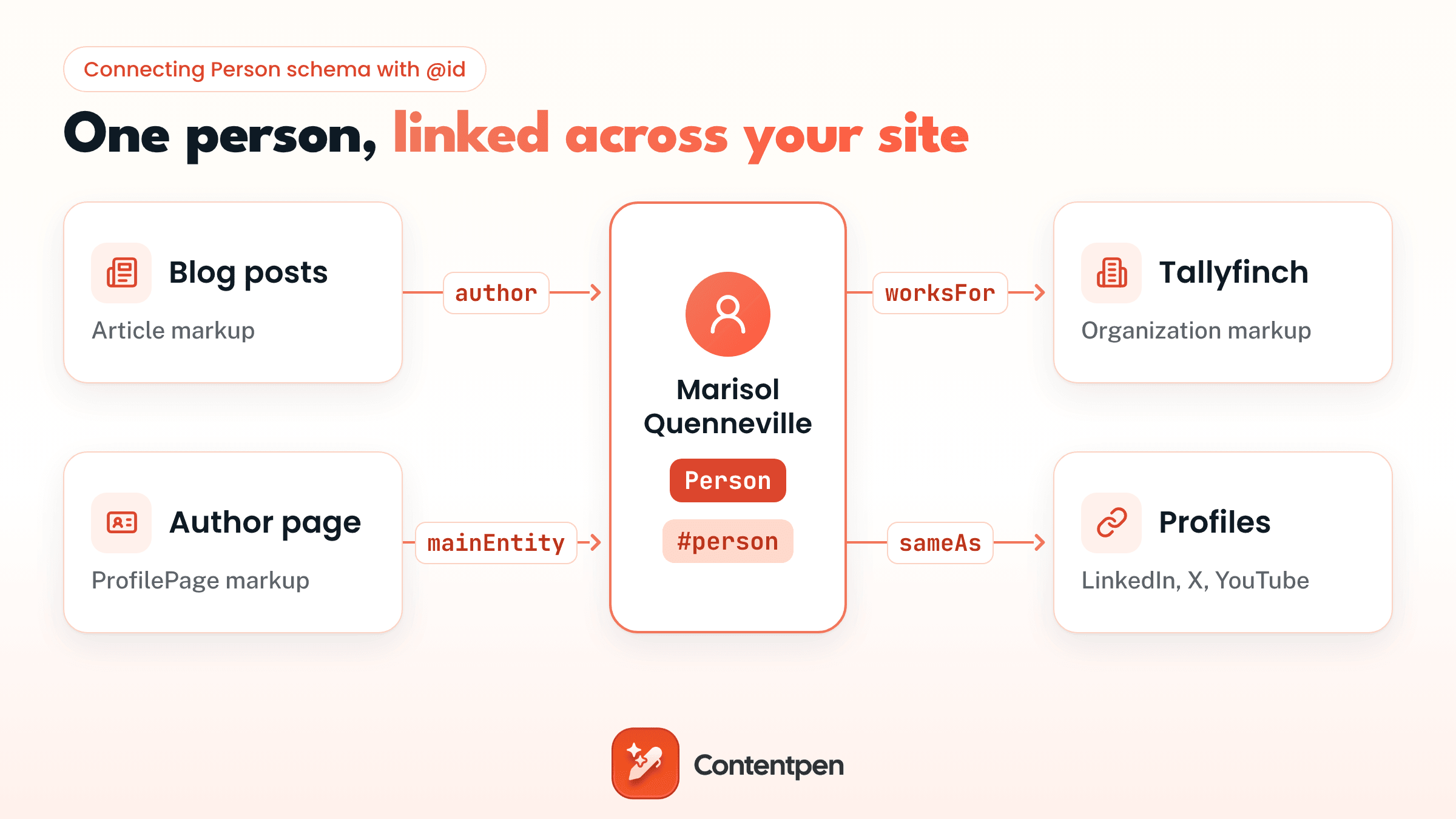
- @id: A permanent ID for Marisol. Reuse it in the author field of every post she writes, so search engines know each byline belongs to the same person.
- name, url, and image: Her byline name, her author page, and a real headshot.
- jobTitle and worksFor: Her role, plus Tallyfinch as an Organization with its own @id, so her markup connects to the company’s.
- description and knowsAbout: A short bio and the three topics she writes about.
- alumniOf and hasCredential: Her university and her CPA license, both mentioned on her author page.
- sameAs: Three profiles that confirm she’s the same Marisol everywhere.
Notice what’s missing: no birth date, no phone number, no home address. Nothing in the block goes beyond what her author page already tells readers.
The ProfilePage wrapper
On Marisol’s author page, the Person block sits inside ProfilePage markup as its mainEntity, which tells Google the whole page is about her:
| { “@context”: “https://schema.org”, “@type”: “ProfilePage”, “dateModified”: “2026-11-20T14:30:00-05:00”, “mainEntity”: { “@type”: “Person”, “@id”: “https://www.example.com/authors/marisol-quenneville/#person”, “name”: “Marisol Quenneville”, “url”: “https://www.example.com/authors/marisol-quenneville/” } } |
We trimmed mainEntity so the wrapper is easy to see. On the live page, paste the full Person block from above in its place. With that done, one @id ties Marisol’s posts, author page, company, and profiles together:
A Person schema template
After learning everything so far, below is a Person schema template you can use today to markup your contributors, authors, and subject-matter experts.
| { “@context”: “https://schema.org”, “@type”: “Person”, “@id”: “https://www.yourdomain.com/authors/your-name/#person”, “name”: “Your name”, “url”: “https://www.yourdomain.com/authors/your-name/”, “image”: “https://www.yourdomain.com/images/your-photo.jpg”, “jobTitle”: “Your job title”, “worksFor”: { “@type”: “Organization”, “@id”: “https://www.yourdomain.com/#organization”, “name”: “Your company”, “url”: “https://www.yourdomain.com/” }, “description”: “One or two sentences about you and what you write about.”, “knowsAbout”: [“Topic one”, “Topic two”], “sameAs”: [ “https://www.linkedin.com/in/your-profile”, “https://x.com/your-handle” ] } |
Self-employed? Drop the worksFor property, or point it at your own business if you run one.
Adding Person schema on your site
You can let an SEO plugin build this markup from your author profiles, or add the code yourself. Either way, finish by testing it.
On WordPress
On WordPress, Yoast SEO and Rank Math already add Person markup for post authors, built from each author’s user profile. Most of the work is filling that profile in properly:
- Go to Users, open the author’s profile, and set “Display name publicly as” to their real name. Yoast drops the Person entirely when the name is something like “admin.”
- Write a short bio in the Biographical Info box. Yoast uses it as the person’s description, trimmed to 250 characters.
- Add the author’s profile URLs in the social or contact fields your SEO plugin adds. These become sameAs.
- Set a profile photo, so the markup has an image to use.
- If the whole site represents you rather than a company, choose Person in your SEO plugin’s site representation settings.
Repeat this for every author, guest writers included, so no post ends up with a half-empty Person behind its byline.
If you publish with Contentpen, one-click publishing sends articles straight to your CMS, whether that’s WordPress, Wix, Webflow, Shopify, Ghost, BigCommerce, or EmDash. On WordPress, you pick the author before each post goes out, so your SEO plugin attaches the right Person automatically.
Publish content directly to your CMS, without copy-pasting
Move from draft to live post in a single step. No hassle, no errors!
Try One-click Publishing →
Manually or with a schema generator
On other platforms, or for a page your plugin doesn’t cover, paste the JSON-LD into the page’s head, wrapped in its script tag. Most site builders have a custom code box for a single page, and on WordPress, a header and footer code plugin does the same job.
A Person schema generator turns a form into code, which saves typing. It can’t check facts, though, so compare every value with the page before you publish.
Testing the markup
To test the Person schema, follow the given steps:
- Paste the code or URL into the Schema Markup Validator. It checks the Person block itself and lists every property it found.
- Run the page through Google’s Rich Results Test to check the Article or ProfilePage markup that contains the Person.
- After you publish, use URL Inspection in Google Search Console to confirm Google can crawl the live page.
Don’t worry if the Rich Results Test shows nothing for a bare Person block. It reports markup tied to Google search features, and Person on its own isn’t one. So the Schema Markup Validator is the better check for Person schema.
Mistakes that weaken Person markup
Below are some mistakes you should avoid when creating and implementing a Person schema.
- Made-up authors: Google’s people-first guidance calls fabricated creator profiles, including “AI-generated headshots, made-up names, or false credentials,” a form of deception. Markup can’t turn a fake expert into a real one.
- Extra text in the name: Titles, credentials, and “Written by” belong in their own properties, not in name.
- Merged co-authors: Two writers squeezed into one Person, like “Marisol Quenneville and team,” describe nobody.
- A different name on every page: “Dr. M. Quenneville” in one byline and “Marisol Q.” in another splits one person into two.
- Borrowed profiles: The sameAs property should not link to a company page or a fan page.
- Claims the page doesn’t make: Don’t put in awards and credentials in the markup that readers can’t see anywhere else.
- Person for a brand: Companies, podcasts, and publications need Organization schema, not Person schema. Add the markup accordingly.
Most of these come down to one habit: write the markup from the visible bio, not from memory. When the page and the code tell the same story, you’re in good shape.
Final thoughts
Readers have always asked the same question before trusting advice: who wrote this, and why should I believe them?
Search engines and AI tools now ask it too. Person schema lets you answer those questions in their language. It won’t make a thin piece of content impressive on its own, but it makes a good one hard to miss.
Start with one author page. Fill in the profile, add the markup, test it, and point every byline at the same @id. Then keep publishing the kind of work that makes that name worth knowing.
Contentpen can help with that part. It’s an AI SEO tool with agents that research, write, optimize, and publish SEO- and GEO-optimized articles. It helps your experts spend their time adding their experience and knowledge, rather than crafting content from scratch.
Write content that’s built to rank, not just read
Create search-optimized blogs aligned with SEO and GEO signals, so your content performs well across search and AI-driven discovery.
Try SEO Blogging FREE →
Frequently asked questions
No, not as a direct ranking boost. However, it does help search engines connect your content to real, identifiable people, which supports what Google looks for in bylines and author pages. It also feeds markup Google does read, like Article and ProfilePage.
Yes. A team page can describe each team member, and a co-written article lists every author separately. Give each person their own @id so the blocks never blur together.
Follow Google’s verification steps. Sign in to a Google account, search for yourself, and select “Claim this knowledge panel,” usually in the About section. It then asks you to sign in to an official profile, such as YouTube, Search Console, X, or Facebook to complete the process.
Open the page, view its source, and search for “application/ld+json” to see the JSON-LD blocks. Or paste the URL into the Schema Markup Validator, which lists every markup it finds on the page, Person schema included.
Not for a handful of authors, since the template above covers them. Generators help when you onboard many contributors. However, read their output before publishing, because some happily add a birth date or email address you never meant to share.
Thing is the most general type in schema.org. Every other type, Person included, inherits its basic properties, such as name, description, image, url, and sameAs. That said, you’ll almost never mark anything up as a plain “Thing.”

Jawwad
Jawwad Ul Gohar is an SEO and GEO-focused content writer with 3+ years of experience helping SaaS brands grow through search-driven content. He has increased organic traffic for several products and platforms in the tech and AI niche. As an author at Contentpen.ai, he provides valuable insights on topics like SEO technicalities, content frameworks, integrations, and performance-driven blog strategies. Jawwad blends storytelling with data-driven content that ranks, converts, and delivers measurable growth.
View all posts by this author