 11 minutes
Writing content that ranks and also shows up in AI answers feels harder in 2026. Algorithms shift, AI summaries steal clicks, and old methods of “gaming” SEO no longer work. If you are asking what is Surfer SEO and how it fits in this new reality, you are not alone.
Surfer SEO is an AI-powered content optimization and visibility platform that studies top-ranking pages, scores your draft, and guides you to match what already wins in Google and AI search.
In this guide, you will see what Surfer SEO does, its pricing, where it shines, where it falls short, and how other tools, including Contentpen, fill the gaps.
Keep reading to decide if it belongs in your stack this year.
Key takeaways
- Surfer SEO scores your content against more than 500 on-page signals and current top competitors. This means the tool focuses on structure, headings, word count, and topical coverage, not only keywords.
- The flagship Surfer SEO content editor and the content audit tool handle most on-page work. The editor guides you while you write or paste drafts, and the audit tool finds quick wins in older posts.
- Surfer SEO pricing currently starts at $59 per month on monthly billing, then climbs as you add documents and advanced features. Higher tiers add deeper SERP analysis and AI search analytics. There is no Surfer SEO free trial or permanent free plan.
- Contentpen is a solid Surfer SEO alternative for creating SEO– and GEO-optimized blogs and articles at scale, with AI visibility tracking included in every plan.
What is Surfer SEO?

Surfer SEO is a content optimization and AI visibility platform that studies current search results and gives you real-time guidelines for structure, keywords, and content depth. It was recently acquired by the French technology group Positive in 2025.
Surfer reverse-engineers the top pages for your target query using more than 500 on-page signals.
These signals include things like average word count, heading patterns, related phrases, and internal link use. Then, you can write with Surfer to create content that ranks on Google and gets cited by AI systems.
You can also paste your existing drafts into Surfer to get on-page SEO pointers and boost your organic traffic and visibility.
The platform has also shifted its NLP algorithms toward Generative Engine Optimization (GEO). Surfer says its system can now improve the chances of your content being cited by AI tools such as ChatGPT, Perplexity, Gemini, and Google AI Overviews.
In short, Surfer is a data-backed content optimization tool for writers, agencies, and SEO teams that want their pages to match real-world winners in both search and AI answers.
What are Surfer SEO’s key features?
Surfer AI brings research, writing support, auditing, and automation together in one place so your team can handle on-page work without hopping across many tools.
You start with keyword research and SERP analysis, then move into the Surfer SEO content editor while writing. After publishing, you use the content audit and AI visibility tools to refresh and expand content accordingly.
Here is how each part fits into a real workflow.
The content editor: Your real-time writing assistant
The Surfer SEO content editor is where most writers spend their time. You open a new document, drop in your primary keyword, and the editor scans the current top results.
Surfer then suggests a target word count, heading count, and paragraph range that match what Google already favors for your query.
While you write, the tool assigns a 0 to 100 SEO content score in the sidebar. It also shows a list of NLP and LSI keywords that you should cover for that topic to improve rankings.

As you use those terms in natural sentences, they turn green, and your score rises, which gives a clear sense of progress.
There is also a Surfer SEO extension that brings these on-page guidelines into Google Docs and other browser tabs where you already work. You can share each draft’s link with other team members as well to ensure better collaboration.
Content audit: Fixing pages that aren’t performing
The content audit feature is the Surfer SEO audit tool for pages that already exist. You give Surfer a URL and a main keyword, and it collects metrics such as current Content Score, ranking position, estimated traffic, and click-through rate.
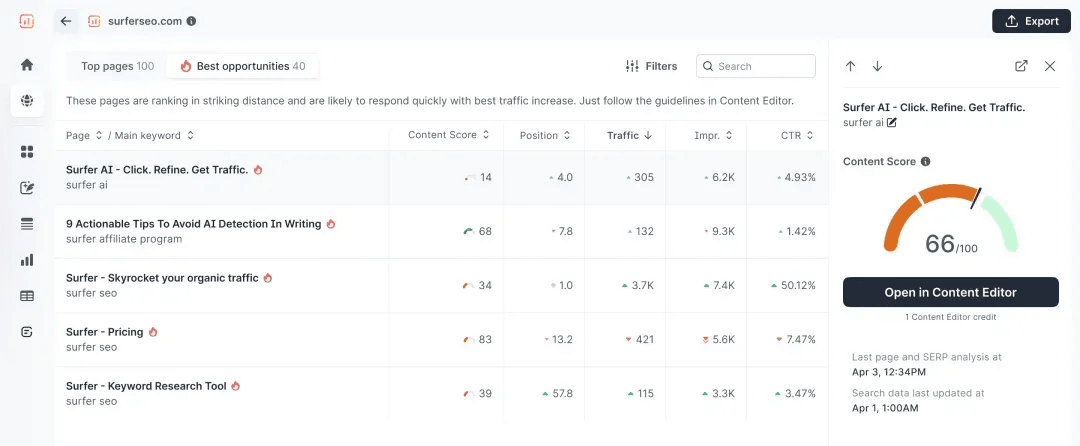
The audit then suggests specific ways to refresh that content in kind of a similar way that Contentpen’s SEO opportunities work.
Surfer can point out missing important phrases, weak headings, or sections that are too thin compared to current winners. It also suggests internal link opportunities, which many teams forget to add manually.
On top of that, the audit reports surface small technical tweaks like title tag length, meta description length, and basic page speed hints. However, you’ll still need a full technical SEO audit tool to detect and fix deep site issues.
Keyword research and the SERP analyzer
Surfer SEO’s keyword research happens inside the app and through a free Chrome extension. You type a seed phrase and get related keywords with search volume, intent, and a Relative Difficulty Score that reflects how tough ranking may be for that keyword.
For deeper insight, the SERP Analyzer breaks down the current first page in extreme detail.
The tool reports things like average word count, keyword frequency, how many words appear above the fold, and how many H2 headings top pages use. It also checks image alt text and external links.
This level of data is helpful, but it can also over-optimize content in our opinion. If you try to copy every single metric, your post can become stiff and hard to read, which usually hurts readability instead of helping it.
The best approach is to use these patterns as clues, not strict rules, and keep the reader experience front and center.
AI content creation capabilities
The AI capabilities of Surfer include both Surfy and Surfer AI, which can create blog sections or full posts, respectively.
- Surfer AI: This is Surfer’s complete AI article generator that can take you from a keyword to a complete draft, including on-page optimization.
- Surfy: Think of Surfy as an AI writing assistant that helps you rewrite sentences and edit paragraphs, but not generate complete prose.
Surfer also adds automation through Brand Voice and other AI tools.
You can train the system on your brand knowledge so AI outputs match your tone and message more closely. That way, even AI-assisted drafts stay closer to your style.
AI visibility and sentiment tracking
One of the few things we liked about Surfer was its shift toward tracking AI brand visibility and sentiment.
The platform, under Positive’s influence, has moved to strategizing and reporting on these important metrics, especially in an era where AEO is taking up brands by storm.
With Surfer’s AI tracker, you get to monitor your mentions and competitor source gaps in 4 AI models, including ChatGPT, Perplexity, Google AI, and Gemini.
Sure, this isn’t the most comprehensive AI coverage in this space. Contentpen, for example, includes an AI visibility tool for 7 major AI models.
However, it is a step in the right direction for Surfer, especially from its beginning as a simple content optimization tool.
Integrations and API access
You can integrate Surfer directly in WordPress, Contentful, Jasper AI, and ChatGPT. You can also get the Surfer browser extension to work directly in Google Docs and other tabs online.
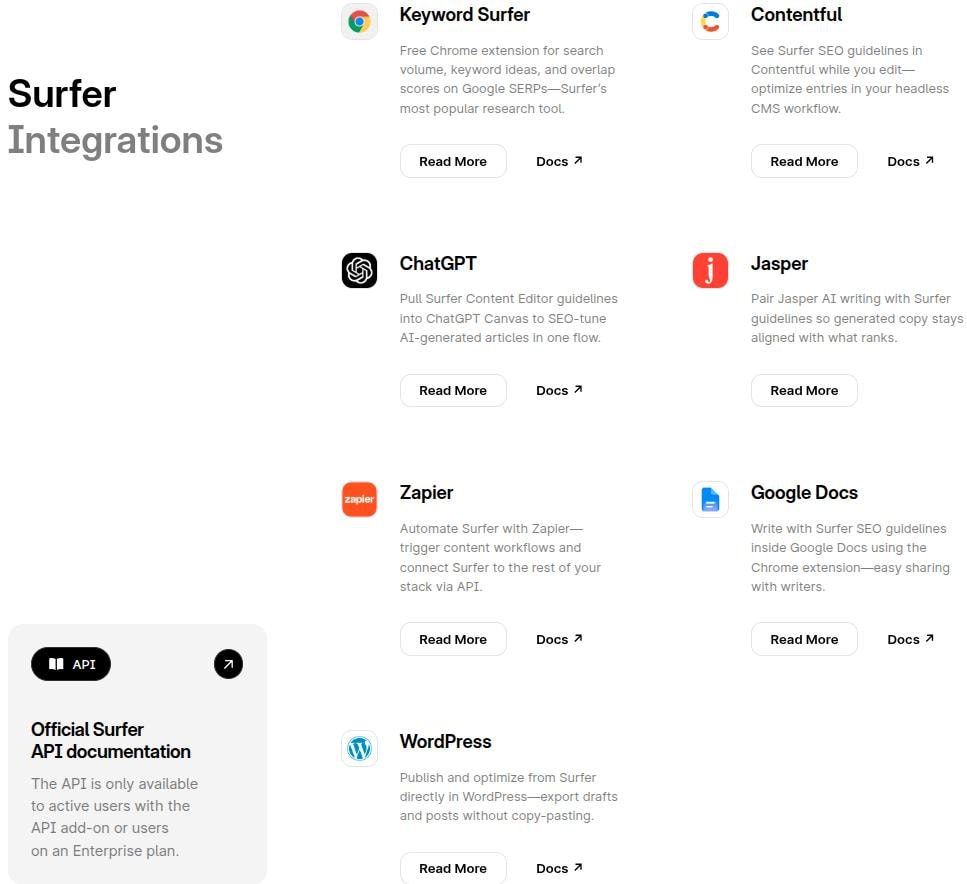
Though the integration list for Surfer is limited, its Zapier connection eventually opens up a lot of avenues for agencies and growth marketers looking to create their own custom workflows.
That said, Surfer’s CMS integrations are quite limited compared to alternatives like Contentpen, which publishes directly to WordPress, Webflow, Shopify, Ghost, Wix, and EmDash, and Frase.
You can also get Surfer API as an add-on or on higher price tiers, such as Peace of Mind and Enterprise.
How much does Surfer SEO cost?
Surfer now uses several plans with different limits, plus a separate AI Search Analytics product for tracking mentions across AI tools. Prices on its site are shown below, billed monthly.
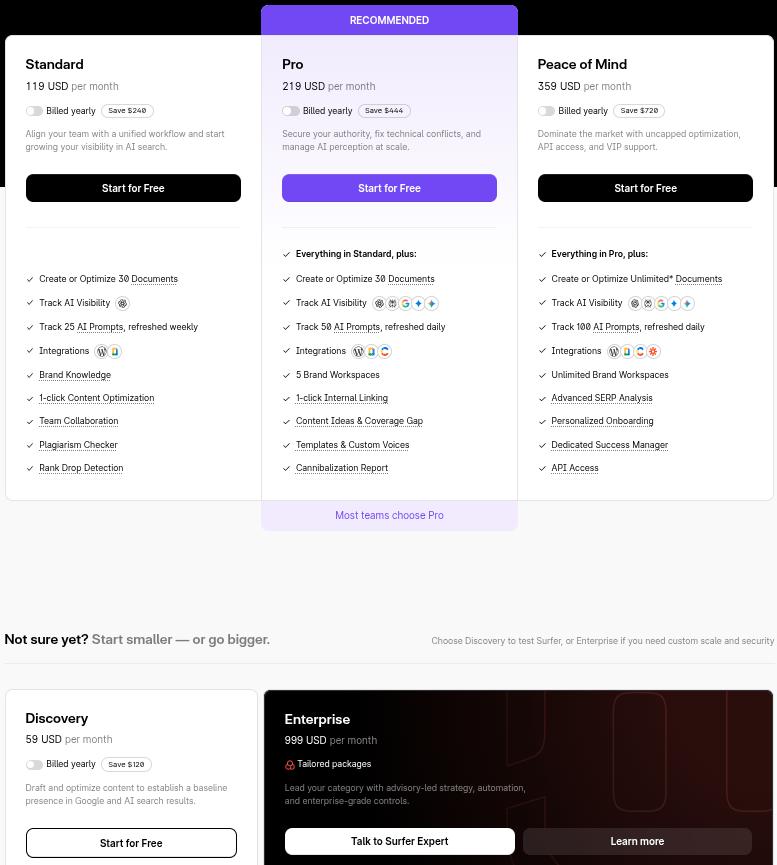
- Discovery: $59/month; Create or optimize 10 documents
- Standard: $119/month; Create or optimize 30 documents, AI visibility tracking, 25 AI prompts
- Pro: $219/month; Get 50 AI prompts, 5 brand workspaces, and custom voices
- Peace of Mind: $359/month; Create and optimize unlimited documents, 100 AI prompts, advanced SERP analysis, and API access
- Enterprise: $999/month; Tailored packages, SSO and enterprise security features included
Please keep in mind that these are the packages for the full AI SEO platform. The AI Search Analytics platform is charged separately with custom pricing.
It is also important to note that the ‘Start for Free’ buttons are gimmicky, as you don’t get a free plan or Surfer trial. You only get a 7-day money-back guarantee.
Is Surfer SEO worth it?
Deciding if Surfer is worth it means going beyond what is Surfer SEO on paper and looking at how it feels in real-life use.
For many SEO specialists, agencies, and freelance writers, it ranks among the best SEO writing tool options for on-page work. For others, the cost or data style makes them lean toward other Surfer SEO alternatives.
On the positive side, Surfer’s content editor makes on-page work easier for users. Writers see direct feedback through the Content Score, suggested headings, and NLP phrases, which speeds up optimization tasks.
Collaboration is easy too, since you can share edits with teammates and plug guidelines into Google Docs or WordPress through the Surfer SEO Chrome extension.
However, there are trade-offs.
The heavy focus on matching every suggested keyword can tempt teams into keyword stuffing just to chase a perfect score. The built-in Surfer SEO keyword research tool is fine for simple use but lags behind Semrush or Ahrefs for deep strategy.
Some users also find the SERP Analyzer overwhelming, with so many metrics that it is hard to know where to focus.
Some Surfer SEO alternatives to consider
So far, it is clear that Surfer is not for everyone. It has its areas where it shines, but severely lags behind in others.
If you want to understand some of the best Surfer SEO alternatives in the market, then take a look at this table below.
| Tool | Best for | Starting price (billed monthly) | Standout feature |
| Contentpen | AI-drafted, SEO- and GEO-ready blogs | $49/month | End-to-end workflow from idea to published post, with AI visibility tracking included |
| Surfer SEO | On-page optimization and AI visibility | $59/month | Content editor with 500+ signals and AI visibility |
| Clearscope | High-end content scoring and keyword grading | $129/month | Simple A to F content grades with strong suggestions |
| Semrush | All-round SEO, PPC, and competitor research | $139.95/month | Broad SEO and AEO suite with rank tracking and site audits |
TL;DR: If your main need is to polish drafts and refresh old content, then Surfer is often worth the spend.
But if you want one place to research, draft, ship long-form content, and track your AI visibility with less manual effort, a content-first platform like Contentpen may give better value.

Write content that’s built to rank, not just read
Create search-optimized blogs aligned with SEO and GEO signals, so your content performs well across search and AI-driven discovery.
Try SEO Blogging FREE →
Final thoughts
Surfer is strongest when it acts as a guide that shapes and upgrades text you already wrote with readers in mind.
If used this way, the tool keeps posts aligned with what Google and AI tools already favor. However, it is less effective as a full writing engine, even though Surfer AI does try to fill that gap.
You will usually get the best results with Surfer SEO when skilled writers or editors lead your content strategy, then use Surfer to tighten coverage, headings, and internal links.
That is how you avoid robotic tone and keyword stuffing while producing quality content.
Frequently asked questions
Surfer SEO is not fully free, but it does offer some limited free AI tools. You can test parts of the Surfer content editor and related features during their 7-day money-back guarantee period before going all in.
Surfer SEO can write content for you through its Surfer AI and Surfy options. However, most teams treat this as a starting point because the text often needs strong human editing to avoid repetition and keep brand voice sharp.
Surfer Academy does offer certifications for SEO and GEO professionals. These are helpful for learning but are not an industry license.
Yes, Surfer SEO is legit and widely used by marketers, agencies, and enterprises worldwide. Also, there have been no major public concerns about its data safety in 2026.
There is no single best AI for SEO in 2026, because needs differ a lot. For on-page scoring, Surfer and Clearscope stand out. For full content creation focused on SEO and GEO, Contentpen is arguably the best choice.

Jawwad
Jawwad Ul Gohar is an SEO and GEO-focused content writer with 3+ years of experience helping SaaS brands grow through search-driven content. He has increased organic traffic for several products and platforms in the tech and AI niche. As an author at Contentpen.ai, he provides valuable insights on topics like SEO technicalities, content frameworks, integrations, and performance-driven blog strategies. Jawwad blends storytelling with data-driven content that ranks, converts, and delivers measurable growth.
View all posts by this author